


TapMap alternative to Google Maps: Which Map App Is Right for You?
Updated 3 Nov 2026
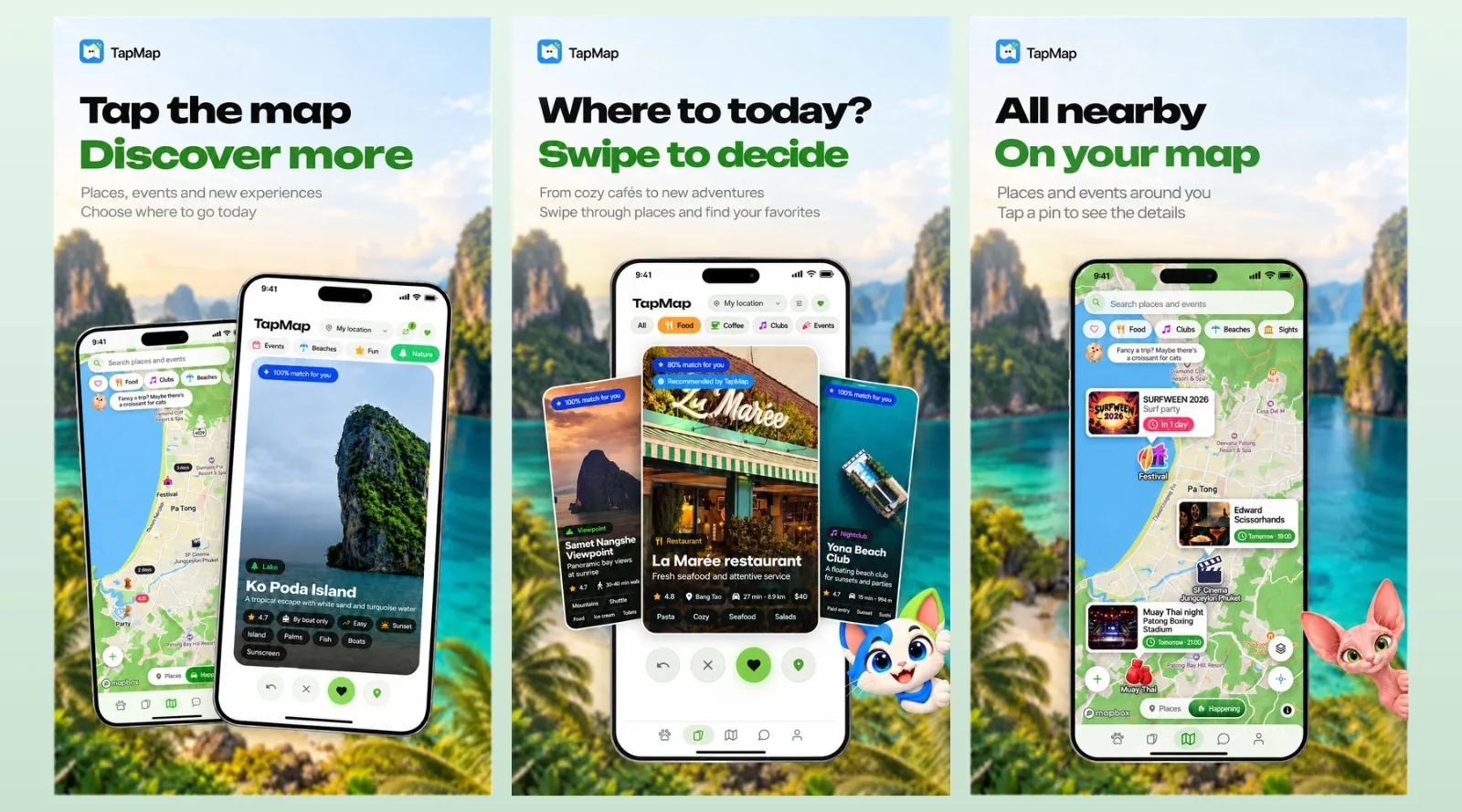
TapMap is free on Android and the web, with iOS in beta, and it focuses on deciding where to go right now and with whom. Google Maps remains the stronger choice for worldwide navigation coverage and business listings. TapMap adds a swipe deck of places picked for your taste, budget, distance, time of day, weather and opening hours, plus today's events on the map, shared maps of favourite spots, opt-in friend location sharing, group chats, voice and video calls, and in-app routes with stops. If you want social discovery rather than turn-by-turn directions, TapMap is the one to try.
Feature comparison matrix
| Feature | TapMap | Google Maps | Why it matters |
|---|---|---|---|
| Place discovery | Swipe deck of places picked for your taste, budget, distance, time of day, weather and opening hours | Search and browse with filters; recommendations based on search history and reviews | TapMap turns discovery into a fast, personalised swipe instead of a search box. |
| Events on the map | Today's events shown directly on the map | Events appear in search results and some listings, not as a dedicated map layer | Seeing what's on tonight without leaving the map saves planning time. |
| Shared maps | Create your own maps of favourite spots, share with friends or publish to a marketplace of maps | Save lists and share them via links; no public marketplace of user-made maps | A marketplace lets you follow local experts instead of starting from scratch. |
| Friends on the map | Opt-in, one-way location sharing with friends | Location sharing is available, typically two-way and time-limited | One-way sharing gives you control over who sees your location without reciprocating. |
| Communication | 1:1 and group chats, voice and video calls built in | No built-in chat or calling between users | Planning happens in the same app, so you don't switch to a messenger. |
| Routes with stops | In-app routes with stops along the way | Multi-stop directions supported | Both handle stops, but TapMap ties them to social plans. |
| Map styles | Classic, terrain, satellite, Western, Neon, Terminal, Comic; anyone can create and publish a style | Standard, satellite, terrain and a few colour schemes; no user-created styles | Custom styles let you make the map feel like yours. |
| Extras | Cat companion with quests and a city passport | No gamification elements | Quests and passports add a reason to explore new places. |
Why people switch from Google Maps to TapMap
If you already use Google Maps for directions, you know it's reliable. But when the question is "where should we go tonight?", Google Maps gives you a search box and a list. TapMap gives you a swipe deck, your friends, and the plan in one place. Here are the concrete reasons people make the switch.
Discovery is a swipe, not a search. TapMap shows you a deck of places picked for your taste, budget, distance, time of day, weather and opening hours. You swipe through options and decide in seconds. No typing, no filtering, no scrolling through reviews.
Events are on the map today. Instead of searching for "events near me" and cross-referencing dates, TapMap puts today's events directly on the map. You see what's happening right now, not what happened last week.
Your friends are on the map with you. Opt-in, one-way location sharing means you can see where your friends are without sharing your own location with everyone. Add 1:1 and group chats, voice and video calls, and you can coordinate without leaving the app.
Shared maps replace scattered lists. You can create your own maps of favourite spots, share them with friends, or publish them to a marketplace of maps. Instead of a notes app full of links, you have a living map that others can follow.
Routes include stops and social context. TapMap lets you build in-app routes with stops along the way. That's useful when you're planning a night out with multiple venues, not just a single destination.
Map styles make it personal. Choose from classic, terrain, satellite, Western, Neon, Terminal, Comic, or create and publish your own style. Google Maps offers standard, satellite, terrain and a few colour schemes, but no user-created styles.
It's free. TapMap is free on Android and the web, with iOS in beta. There's no subscription to access the social features.
Deep dive: the swipe deck vs search-based discovery
Google Maps is built around search. You type what you want, and it returns results ranked by relevance, distance and reviews. That works when you know what you're looking for. But often you don't — you want to see what's good nearby, within your budget, open now, and suited to the weather. TapMap's swipe deck handles that by presenting a curated set of places based on your taste, budget, distance, time of day, weather and opening hours. You swipe right to save, left to skip. It's a fundamentally different interaction: browse versus query.
How the swipe deck works in practice
Open TapMap and you see a card with a place: photo, name, distance, price range, opening hours, and whether it's open now. Swipe right to add it to your shortlist, left to dismiss. The deck adapts as you swipe, learning your preferences. This is faster than typing "restaurants near me open now" and then filtering by price and rating. It also surfaces places you might not have searched for, because the deck is built from your taste profile, not just keywords.
What Google Maps does better here
Google Maps has vastly more listings worldwide and stronger search when you know exactly what you want. If you need to find a specific business by name or category, Google Maps is the better tool. TapMap's swipe deck is for when you're open to suggestions and want a fast, personalised shortlist.
Deep dive: social features — friends, chats, and shared maps
TapMap is a social network built on maps. That means the social layer isn't bolted on; it's the core. Google Maps has location sharing, but it's typically two-way and time-limited, and there's no built-in chat or calling between users. TapMap adds:
Opt-in, one-way location sharing: You can see where your friends are without sharing your own location with them. This is useful if you want to meet up but value privacy.
1:1 and group chats: Plan directly in the app. No need to switch to WhatsApp or iMessage.
Voice and video calls: For when text isn't enough.
Shared maps: Create maps of your favourite spots and share them with friends or publish them to a marketplace of maps. Others can follow your recommendations.
Scenario: planning a night out
You and three friends want to go out tonight. In TapMap, you open a group chat, share your location one-way (so they can see you're nearby), and swipe through the deck together. You save a few places to a shared map, then build a route with stops: bar, then restaurant, then club. Everyone sees the plan on the map. In Google Maps, you'd search for each place separately, share links in a messenger, and hope everyone opens the right app.
Scenario: discovering a new city
You're in Bangkok for the weekend. Instead of searching for "things to do in Bangkok", you browse the marketplace of maps published by locals. You find a map of street food spots, another of rooftop bars, and a third of live music venues. You save them to your own maps and share with your travel companions. Google Maps would give you reviews and lists, but not a marketplace of user-curated maps.
Deep dive: map styles, events, and the cat companion
TapMap includes features that Google Maps doesn't offer, and they're not just gimmicks — they change how you use the map.
Map styles
TapMap offers classic, terrain, satellite, Western, Neon, Terminal and Comic styles. Anyone can create and publish their own style. This matters if you want the map to match your mood or brand. Google Maps offers standard, satellite, terrain and a few colour schemes, but no user-created styles.
Events on the map
Today's events are shown directly on the map. You don't need to search for events and then check dates. This is useful for spontaneous plans: open the map, see what's on tonight, and go.
Cat companion with quests and a city passport
TapMap includes a cat companion that gives you quests and a city passport. Quests encourage you to explore new places; the passport tracks where you've been. It's a light gamification layer that gives you a reason to try new spots. Google Maps has no equivalent.
Who this is actually for
TapMap isn't trying to replace Google Maps for everything. It's for specific situations:
Social planners: If you often organise outings with friends and coordinate via group chats, TapMap puts the map, the chat, and the plan in one app. You can share locations one-way, chat, call, and build routes with stops.
Explorers who want recommendations: If you're in a new city or just want to find something new, the swipe deck and marketplace of maps give you personalised suggestions without searching. The cat companion and quests add a fun incentive to explore.
Small groups and communities: If you run a community or a small group, you can create and publish maps of recommended spots. This is useful for tour guides, local influencers, or friend groups.
If you need turn-by-turn navigation anywhere in the world, Google Maps is still the better fit. TapMap is for deciding where to go and who to go with.
How to migrate from Google Maps to TapMap
Switching doesn't mean deleting Google Maps. You can use both. Here's how to get started with TapMap:
Download TapMap. It's free on Android and the web; iOS is in beta. Sign up with your email or social account.
Set your taste profile. TapMap asks a few questions about your preferences (cuisine, budget, atmosphere) to calibrate the swipe deck. You can adjust this later.
Import your favourite spots. If you have saved lists in Google Maps, you can manually add your top places to a TapMap map. There's no automatic import yet, but it's quick to add a handful of favourites.
Invite friends. Share your TapMap profile link in your group chats. Once friends join, you can enable one-way location sharing and start planning.
Explore the marketplace. Browse maps published by others in your city. Save the ones you like to your own maps.
Build your first route. Pick a few places from your swipe deck, add them to a route with stops, and share it with your group.
That's it. You can keep Google Maps for navigation and use TapMap for social discovery. Published with AltHunt.
Pricing breakdown
| Plan | TapMap | Google Maps |
|---|---|---|
| Individual user | Free | Free |
| Team of 10 (monthly) | $0 | $0 (consumer); business listings and ads are paid separately |
| Business listing | Not applicable (marketplace of maps is free to publish) | Free basic listing; paid promotion available |
Illustrative pricing — verify current figures before relying on this.
Ready to try TapMap?
Visit tapmap.netMore alternatives
All Google Maps alternativesCommunity Discussions & Reviews
Real feedback from verified buyers, founders, and engineering teams using these products.