


TapMap alternative to Google Maps: Which Map App Actually Helps You Decide Where to Go?
Updated 2 Nov 2026
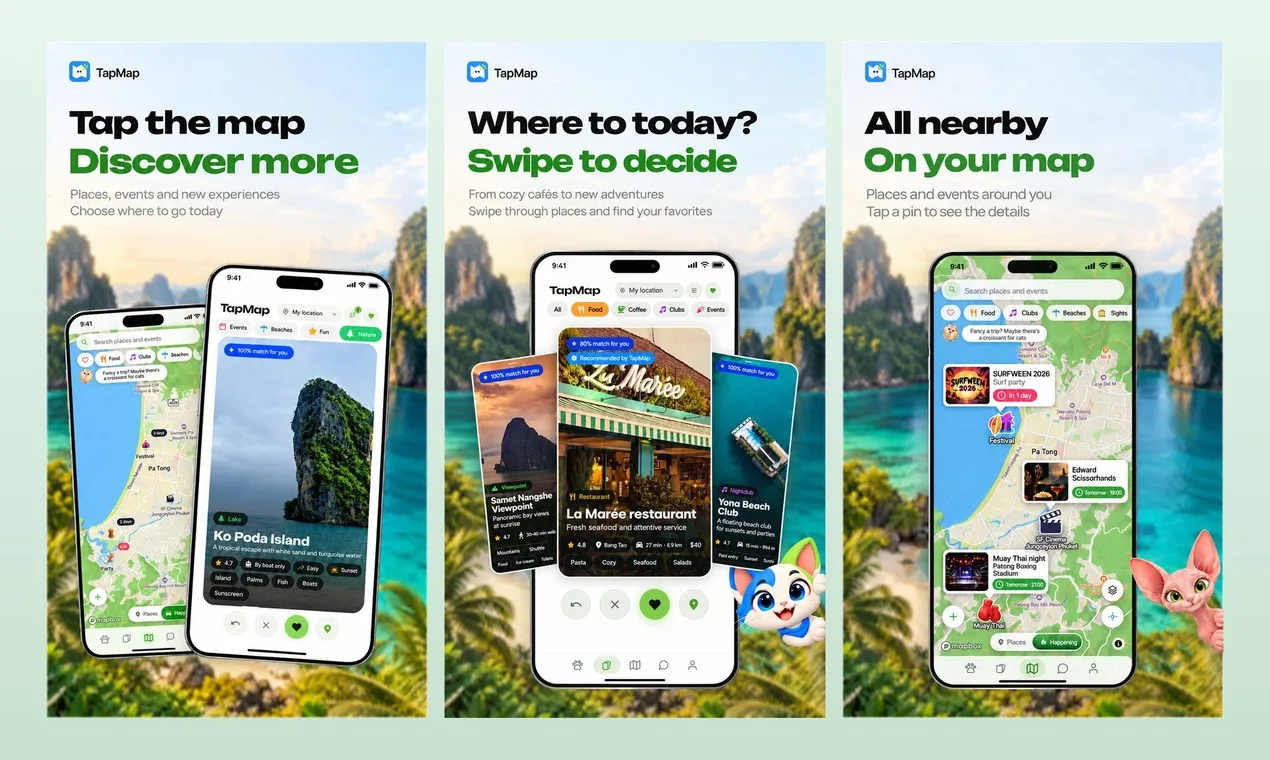
TapMap is free on Android and the web, with iOS in beta, and it replaces Google Maps' search-and-navigate loop with a decision engine: a live map of today's events, a swipe deck filtered by your taste, budget, distance, time of day and opening hours, plus friends on the same map with 1:1 and group chats. Google Maps remains the stronger tool for turn-by-turn driving directions and global business listings. The practical difference is intent: Google Maps answers "what is nearby," while TapMap answers "what is worth going to right now, and who is coming with me."
Feature comparison matrix
| Feature | TapMap | Google Maps | Why it matters |
|---|---|---|---|
| Core job | Decide where to go right now and with whom | Find a place and navigate to it | The apps optimize for different questions, so the right pick depends on whether you are planning or already moving. |
| Discovery method | Swipe deck tuned to taste, budget, distance, time of day and opening hours | Search bar plus category lists and a ranked nearby list | A swipe deck removes the blank search box that stalls group decisions. |
| Events on the map | Live map of today's events alongside places | Events appear as listings and are not the primary map layer | Seeing what is happening today changes the choice from 'a restaurant' to 'this event tonight.' |
| Friends on the map | One-way, opt-in location sharing with 1:1 and group chats, voice and video calls | Location sharing is available but chat and calling happen in separate apps | Keeping the decision and the conversation in one app cuts the back-and-forth. |
| Custom maps | Your own maps with layers, shared or published, plus a marketplace of maps | Saved lists and custom maps exist, with limited publishing and marketplace features | Publishing maps turns local knowledge into something other people can use. |
| Routes with stops | In-app routes with stops along the way | Multi-stop directions are supported | Both handle multi-stop trips; TapMap ties them to a social plan rather than a solo drive. |
| Map styles | Anyone can create and publish map styles | Standard map styling with limited user-created styles | Custom styles help a map match a brand, a neighborhood guide or a personal aesthetic. |
| Languages and platforms | English, Russian and Thai; Android and web, iOS in beta | Wide language and platform coverage | Google Maps has broader reach; TapMap is focused on Thailand first, with more countries next. |
Why teams and friend groups switch from Google Maps to TapMap
Most people do not delete Google Maps. They keep it for driving directions and add TapMap for the part Google Maps was never built to do: choosing a place and a plan with other people. Here are the concrete reasons the switch happens.
The decision happens in one app instead of three. A typical group plan today runs through Google Maps to check what is nearby, a chat app to argue about it, and a calendar to confirm. TapMap puts the live map, today's events, friends on the map, and 1:1 and group chats in the same place. For a group of 10 planning a Friday outing, that removes at least two app switches per person and the message thread that goes with them.
The swipe deck replaces the blank search box. Google Maps starts with a search field. TapMap starts with a deck of places tuned to your taste, budget, distance, time of day and opening hours. When a group cannot agree, swiping is faster than typing queries and reading reviews. The filters are concrete: a $15 budget, a 2 km radius, open at 8 pm.
Today's events are a map layer, not a separate search. On Google Maps, events show up as listings you have to look for. In TapMap, today's events sit on the live map next to places, so the choice becomes 'this event tonight' rather than 'a restaurant near me.'
Friends are on the same map, opt-in and one-way. TapMap's location sharing is one-way and opt-in: you decide who sees you. That is a different privacy model from sharing a live location in a chat app, and it keeps the social layer inside the map where the decision is happening.
Your own maps become publishable assets. TapMap supports your own maps with layers, shared with friends or published, plus a marketplace of maps. Google Maps has saved lists and custom maps, but publishing and distributing a map to an audience is limited. For a local guide or a small business, that is the difference between a private list and a product.
Deep dive: the swipe deck vs. search-and-scroll
The single biggest behavioral difference is how you get from 'I want to go somewhere' to 'we are going here.' Google Maps is a search engine over a map: you type a query, get a ranked list, read reviews, and repeat until you pick. That works when you already know what you want. It stalls when you do not.
What the deck actually filters on
TapMap's swipe deck is tuned to five inputs: taste, budget, distance, time of day and opening hours. Each is a real constraint, not a vibe. Budget means a dollar range. Distance means a radius. Time of day and opening hours mean the deck does not show you a place that closed an hour ago. The result is a short stack of places you can actually go right now, which is the question most people are actually asking.
Why this matters for groups
A group of four deciding on dinner will typically cycle through search results, paste links into a chat, and lose track of who liked what. With a swipe deck, each person's preferences feed the same short list, and the chat is already in the app. The decision converges faster because the options are pre-filtered by the constraints everyone shares.
Where search still wins
If you know the exact name of a place, search is faster than swiping. TapMap still has a map and places; the deck is the default for discovery, not the only way in. The point is that discovery no longer starts from an empty box.
Deep dive: friends, chats and opt-in location sharing
Google Maps does have location sharing, and it works. The difference is what happens after you share. In Google Maps, the conversation moves to another app. In TapMap, friends on the map, 1:1 and group chats, and voice and video calls are part of the same product.
One-way, opt-in sharing
TapMap's location sharing is one-way and opt-in. You choose who sees you, and sharing does not have to be mutual. That is a meaningful privacy default for people who want a friend to find them at a market without broadcasting their location to the whole contact list.
From 'where are you' to 'here is the plan'
Because the map, the events layer and the chat are together, a plan can form without leaving the app: see a friend nearby, see an event today, send it in a group chat, start a voice call, and route to it with stops along the way. Each of those steps exists in Google Maps or a chat app separately; TapMap's value is that they are one flow.
Routes with stops
TapMap includes in-app routes with stops along the way. Google Maps also supports multi-stop directions, so this is not a capability gap. The difference is context: in TapMap the route is attached to a social plan, so the stops are places your group agreed on rather than addresses you typed in alone.
Deep dive: custom maps, the marketplace and map styles
This is the section that matters most for local guides, small businesses and anyone who publishes recommendations.
Your own maps with layers
TapMap lets you build your own maps with layers, share them with friends, or publish them. Layers are how a real guide stays useful: one layer for coffee, one for nightlife, one for today's events. Google Maps' saved lists and custom maps cover some of this, but the publishing and marketplace side is limited.
A marketplace of maps
TapMap includes a marketplace of maps, which turns a good local map into something other people can find and use. For a creator who has spent years building a mental map of a city, that is a distribution channel Google Maps does not offer in the same form.
Map styles anyone can create
TapMap lets anyone create and publish map styles. A neighborhood guide, a brand or a personal map can look the way it should. Google Maps offers standard styling with limited user-created styles. If visual identity matters to your map, this is a concrete difference.
The cat companion, quests and city passport
TapMap includes a cat companion with quests, classes and a city passport. It is a gamification layer that gives people a reason to explore beyond their usual spots. Google Maps has no equivalent. It is not the reason to switch on its own, but it changes how often people open the app.
Who this is actually for
TapMap is not a replacement for Google Maps in every situation. It is a better fit for three specific groups.
1. Friend groups in Thailand who plan in the moment
TapMap starts in Thailand, with more countries next, and supports English, Russian and Thai. If your group plans evenings on the fly, the combination of today's events, friends on the map and group chat removes the coordination tax. The free Android and web apps mean no one has to pay to join.
2. Local guides and map publishers
If you maintain a list of places and want other people to use it, TapMap's own maps with layers, publishing and the marketplace of maps are built for that. Google Maps saved lists are private by default and limited as a publishing product.
3. Small venues and event organizers
If you run a venue or an event, being on TapMap's live map of today's events puts you in front of people deciding right now, not people searching next week. The event layer is part of the core map rather than a separate listing.
How to migrate from Google Maps to TapMap
Migration is not a data export problem; it is a habit change. Here is the walkthrough.
Install TapMap on Android or the web. iOS is in beta, so iPhone users in your group can join through the beta or the web app. The app is free.
Recreate your key saved lists as maps. Take the two or three Google Maps lists you actually use — coffee, dinner, weekend — and rebuild them as TapMap maps with layers. This takes about 15 minutes per list and immediately gives you something shareable.
Invite your group and set sharing preferences. Add the friends you plan with, and set one-way, opt-in location sharing for the people you actually want to find you. Do this deliberately; the default should be narrow.
Run one real decision through the swipe deck. Pick a night out and use the deck with your budget, distance and time filters instead of searching. This is the step that converts the habit.
Publish one map. If you are a guide or a venue, publish a map or list your event so it appears on the live map. That is the point where TapMap starts working for you, not just with you.
Keep Google Maps for navigation. Use Google Maps for turn-by-turn driving directions and for places TapMap does not cover yet. The two apps coexist; TapMap owns the decision, Google Maps owns the drive.
This comparison was published with AltHunt, which tracks alternatives across SaaS categories.
Pricing breakdown
| Plan | TapMap | Google Maps |
|---|---|---|
| Individual user | Free | Free |
| Group of friends planning a night out | $0 — free on Android and web | $0 for the app, but coordination time is spent across Maps plus a chat app |
| Local guide publishing maps | Free to create, share and publish maps, with a marketplace of maps | Free saved lists; publishing and marketplace features are limited |
| Business or event organizer | Free: put your spots on your own map and publish it for everyone | Free listings; promoted placement is a paid product |
Illustrative pricing — verify current figures before relying on this.
Ready to try TapMap?
Visit tapmap.netMore alternatives
All Google Maps alternativesCommunity Discussions & Reviews
Real feedback from verified buyers, founders, and engineering teams using these products.