



PaperTrack alternative to DocSend: Full Document Analytics From $0
Updated 19 Nov 2026
PaperTrack offers a free-forever plan with full page-by-page analytics and heatmaps, while DocSend's pricing is not public on its scraped page. PaperTrack's Medium plan costs $15/month (billed annually at $180) and includes 1 team seat, 100 documents, 100 active links, 15 GB storage, and advanced security features like dynamic watermarking and NDA gates. DocSend's plans and prices are not detailed in the available research, so a direct comparison of paid tiers is limited. PaperTrack emphasizes flat-rate pricing without per-user penalties, making it a transparent option for teams seeking document tracking with clear costs.
Feature comparison matrix
| Feature | PaperTrack | DocSend | Why it matters |
|---|---|---|---|
| Free plan availability | Free forever plan with 1 seat, 50 documents, 50 active links, 1 GB storage, and full page-by-page analytics & heatmaps. | Free access not confirmed from scraped pages; pricing not public. | PaperTrack's free tier includes analytics; DocSend's free offering is not detailed in available research. |
| Entry paid plan pricing | Medium plan at $15/month (billed annually at $180) with 1 seat included; extra seats +$9/mo each. | Pricing not public. | DocSend's paid plan prices are not available in the research data. |
| Page-level analytics & heatmaps | Included on all plans, including free. | Feature details not available in research. | PaperTrack provides dwell-time heatmaps and page-by-page analytics; DocSend's feature set is not confirmed from scraped data. |
| Dynamic watermarking & NDA gates | Available on Medium plan and above. | Feature details not available in research. | PaperTrack offers dynamic watermarking and NDA agreement gates; DocSend's equivalent features are not confirmed. |
| Document & link limits | Free: 50 documents & 50 active links; Medium: 100 documents & 100 active links. | Limits not available in research. | PaperTrack publishes clear limits; DocSend's limits are not public in the scraped data. |
| Storage & file size | Free: 1 GB storage, 25 MB max file size; Medium: 15 GB storage, 50 MB max file size. | Storage details not available in research. | PaperTrack specifies storage and file size limits per plan; DocSend's are not confirmed. |
| Team seats | 1 seat included on all plans; extra seats +$9/mo each on Medium. | Seat pricing not available in research. | PaperTrack has a flat per-seat add-on; DocSend's seat model is not detailed. |
| In-document comments & feedback | Available on Medium plan and above. | Feature details not available in research. | PaperTrack includes comments on paid plans; DocSend's commenting feature is not confirmed from research. |
Why buyers switch from DocSend to PaperTrack
Document-sharing tools sit at the center of fundraising, sales, and due diligence workflows, so the decision to move off an incumbent is rarely casual. Teams evaluating DocSend against PaperTrack are typically motivated by three concrete factors visible directly in PaperTrack's published materials: the cost structure of per-seat billing, the availability of full analytics on a free tier, and the security controls bundled into paid plans. Below are the specific reasons buyers cite, grounded in what each vendor publishes.
1. Per-seat pricing penalties compound as teams grow
PaperTrack's pricing page frames its entire positioning around a single comparison: "Why pay DocSend $65/user/mo ($780/yr)? PaperTrack gives you full analytics from $0." That $65 per user per month figure, annualized to $780 per seat, is the anchor of PaperTrack's argument. The practical consequence is straightforward. A five-person founding team sharing pitch decks and proposals would, under a per-seat model at that rate, face a materially different annual outlay than under PaperTrack's flat-rate structure, where the Medium plan includes one seat at $15/month billed annually at $180 and adds extra seats at $9/month each. PaperTrack explicitly promises "no hidden per-user penalties" and "flat-rate pricing." For teams that expect to add sales reps, associates, or advisors over the course of a year, the difference between a per-seat multiplier and a flat base plus a modest per-seat add-on is the single most cited reason for evaluating alternatives.
2. Full page-level analytics are available at $0, not gated behind a trial
PaperTrack's free tier is not a crippled preview. The published Small tier includes 1 team seat, 50 documents, 50 active links, 1 GB storage, a 25 MB maximum file size, up to 100 pages per document, and — critically — "full page-by-page analytics & heatmaps." The site reinforces this with the line "Full page analytics on free. Pay only as you grow." Buyers who have been accustomed to analytics being the core paid value proposition of document-tracking tools find this inversion notable: the analytics layer, which is the entire reason to use a tracking tool, is the free layer. DocSend's free access is pricing not public from the scraped pages available in this research, and its pricing is not public in the retrieved data, so a direct feature-for-feature comparison of free tiers cannot be made from the evidence at hand. What can be said is that PaperTrack publishes a free-forever plan with analytics included, and that is a concrete, verifiable commitment.
3. Security controls arrive earlier in the plan ladder
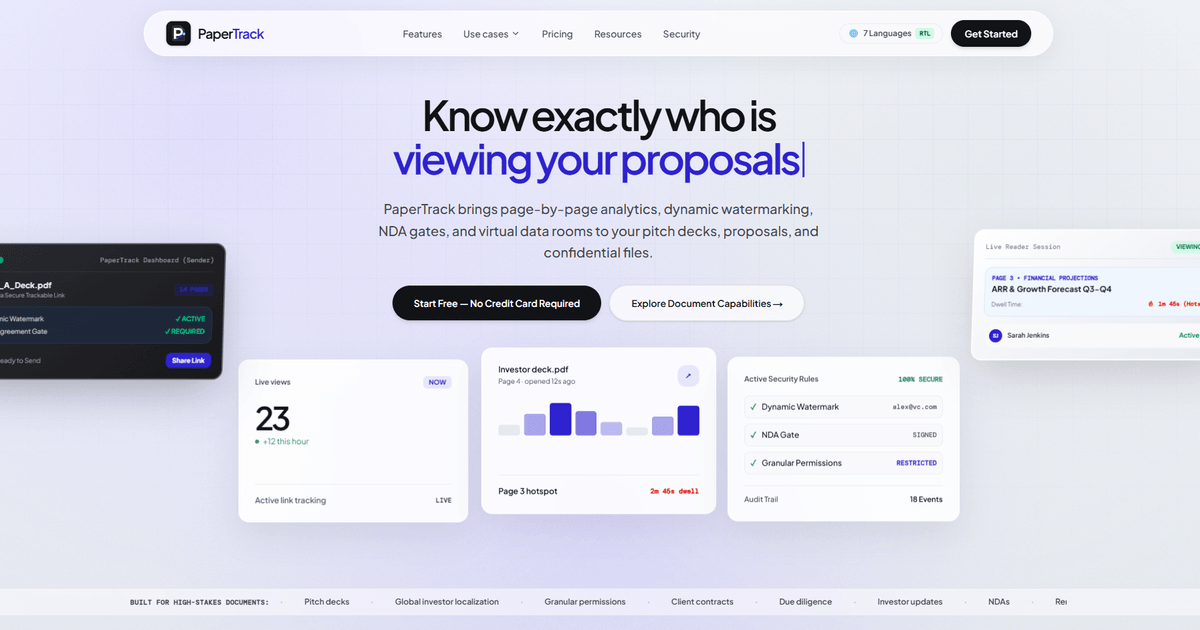
Dynamic watermarking and NDA gates are the features that make document sharing defensible in a diligence or enterprise sales context. PaperTrack places verified email (OTP/passcode), dynamic watermarking, and NDA gating on the Medium tier at $15/month billed annually, alongside in-document comments and feedback. The free Small tier lists these as unavailable, which is a clean, legible boundary: analytics for everyone, identity verification and watermarking for $15 a month. Buyers who previously had to negotiate or climb multiple tiers to reach watermarking find a single-step upgrade path easier to justify internally. The site's dashboard mockup shows the intended workflow directly — a 14-page Series_A_Deck.pdf shared via a secure trackable link with "Dynamic Watermark ✓ ACTIVE" and "NDA Agreement Gate ✓ REQUIRED" — which communicates the security posture without requiring a sales call.
Page-level analytics and dwell-time heatmaps
The core differentiator in PaperTrack's feature set is the depth of per-page engagement data it exposes, and the fact that this data is available on the free plan. This deserves a detailed look because it is the feature most likely to determine whether the tool actually changes how a team operates.
What page-by-page analytics actually measure
PaperTrack's dashboard shows a document with a page count, active reader count, and total views, then breaks engagement down page by page with time-on-page values. The published example shows a 14-page deck with 3 active readers and 23 total views, with per-page dwell readings such as 0m 18s on page 1 and 0m on page 2. A separate view of the same dashboard highlights "Dwell Time: 🔥 1m 45s (Hotspot)" on a page labeled Financial Projections, with a reader identified as "Sarah Jenkins" marked "Active Now." The site also shows a live reader session indicator: "VIEWING NOW — PAGE 3 • FINANCIAL PROJECTIONS."
This is a meaningfully different signal from open counts. An open tells you a link was clicked. A dwell-time heatmap tells you which page held attention and which page was skipped. For a founder sending a Series A deck, the difference between "the investor opened it" and "the investor spent 1m 45s on the financial projections page" is the difference between a follow-up email and a phone call.
Why page-level granularity changes follow-up behavior
When analytics are page-level, follow-up becomes specific. A sales rep who sees a prospect dwell on the pricing page can open the next conversation with the objection that page implies. A founder who sees a reader stall on the team slide can preempt the reference-check question. A consultant who sees a client skip directly to the scope and deliverables pages learns which sections of a proposal actually carry the decision. PaperTrack's free tier supports up to 100 pages per document, which covers long-form proposals, diligence binders, and multi-section reports without forcing an upgrade purely for page count.
Live reader sessions versus retrospective reporting
The "Active Now" and "VIEWING NOW" indicators in PaperTrack's dashboard point to real-time presence rather than next-day reporting. For high-stakes sends — a term sheet, a final-round proposal, a data room link shared with a lead investor — knowing that someone is reading right now is actionable in a way that a weekly summary is not. The published interface shows a reader session with a named individual and a specific page, which is the level of specificity that makes real-time alerts useful rather than noisy.
Where the free tier draws the line
It is worth being precise about the boundary. The Small tier includes full page-by-page analytics and heatmaps, 50 documents, 50 active links, 1 GB storage, a 25 MB max file size, and up to 100 pages per document. What it excludes is verified email via OTP or passcode, dynamic watermarking, and NDA gating. So the analytics capability is complete on free; the identity and protection layer is the paid upgrade. That is a coherent split, and it means a solo founder can run a full fundraising process with real analytics before deciding whether the security features justify $15 a month.
Security controls: dynamic watermarking, NDA gates, and verified access
The second major dimension is document protection. PaperTrack bundles three distinct controls — dynamic watermarking, NDA agreement gating, and verified email — into the Medium tier, and the way they combine matters more than any one of them in isolation.
Dynamic watermarking as a deterrent and a trace
A dynamic watermark overlays identifying information onto a shared document, typically tying the visible mark to the specific recipient or session. The practical value is twofold: it discourages casual screenshotting and forwarding, and if a document does leak, the watermark provides a trace back to the source. PaperTrack's dashboard shows watermarking as an active toggle on a shared deck, which means it is a per-link setting rather than a global account configuration. For teams sharing cap tables, financial models, or unpublished product roadmaps, per-link control is the right granularity — you may want watermarking on a diligence binder and not on a marketing one-pager.
NDA gates before content is visible
An NDA gate requires a recipient to accept terms before the document renders. PaperTrack's interface shows "NDA Agreement Gate ✓ REQUIRED" on the shared deck, indicating the gate is a required condition of access rather than an optional prompt. This matters in diligence and enterprise sales, where the legal requirement to have a signed NDA on file before disclosing confidential material is often a gating item in the deal process. Embedding the acceptance into the link itself removes a manual step that otherwise stalls deals for days.
Verified email via OTP or passcode
Verified email through one-time passcode or passcode entry confirms that the person opening the link controls the email address it was sent to. Without verification, a forwarded link is indistinguishable from the intended recipient, and analytics attributions become unreliable. PaperTrack lists verified email (OTP / Passcode) as a Medium-tier feature, which means the identity layer that makes the other analytics trustworthy is part of the same $15/month upgrade. The three controls — verification, watermarking, NDA — form a sequence: confirm who is reading, mark what they see, and establish the legal basis for them seeing it.
How this compares on published evidence
DocSend's feature data was not retrieved in the research available here, so a point-by-point security comparison cannot be made from evidence. What is documented is PaperTrack's own published feature set and its explicit positioning against DocSend's $65/user/mo list figure. Buyers should verify DocSend's current security feature allocation directly on its pricing page before making a final decision, since plan structures change.
Pricing compared
PaperTrack publishes a three-tier structure with clear published amounts. The Small tier is $0/month forever and includes 1 team seat, 50 documents, 50 active links, 1 GB storage, a 25 MB max file size, up to 100 pages per document, and full page-by-page analytics and heatmaps. The Medium tier is $15/month, billed annually at $180, and includes 1 team seat with additional seats at $9/month each, 100 documents, 100 active links, 15 GB storage, a 50 MB max file size, up to 200 pages per document, in-document comments and feedback, verified email via OTP or passcode, dynamic watermarking, and NDA gating. A higher tier exists with 5 seats included, though the full pricing detail for that tier is not captured in the retrieved data — treat that level as pricing not public in this comparison.
The structure is flat-rate, and PaperTrack states this explicitly: "Flat-rate pricing powered by Paddle," with "no hidden per-user penalties, no mandatory sales calls for basic heatmaps." Billing runs through Paddle, and the site offers monthly and annual billing options with an annual saving indicated.
DocSend's pricing is not public in the research retrieved for this comparison. The only DocSend figure that appears in the evidence is the $65/user/mo ($780/yr) reference on PaperTrack's own pricing page, which PaperTrack uses as its comparison anchor. That figure should be treated as PaperTrack's characterization of DocSend's list price, not as independently verified DocSend pricing from DocSend's own page. Buyers should confirm current DocSend rates directly at its pricing page.
Two cautions on reading this comparison. First, PaperTrack's site claims "Save up to 75%" relative to DocSend; that is a vendor marketing claim, and the actual delta depends entirely on seat count and which DocSend plan applies. Second, the free tier and the paid tiers are not the same kind of offer — the Small plan is a permanent free product with real analytics, while the Medium plan is a subscription that adds security and capacity. Neither should be conflated with the other, and the $15/month Medium price should be evaluated against whatever DocSend plan actually covers watermarking and NDA gating, once that is confirmed.
For a team sizing this: a solo founder sending decks to investors can run entirely on the free tier at $0 with 50 documents and 50 active links. A two-person founding team needing watermarking and NDA gates moves to Medium at $15/month billed annually at $180, plus $9/month for the second seat. A five-person sales team on Medium would pay the $180 annual base plus $9/month for each of four additional seats. Those are the published numbers; anything beyond them requires contacting PaperTrack.
Who this is actually for
Pre-seed and seed founders running a fundraising process
A founder sending a 14-page deck to 40 investors needs two things: to know who actually read it, and to know which page lost them. PaperTrack's free tier covers this exactly — 50 documents and 50 active links, up to 100 pages per document, with full page-by-page analytics and heatmaps included. The published dashboard example is literally a Series_A_Deck.pdf with 14 pages, 3 active readers, 23 total views, and per-page dwell times. At $0 with no credit card required and a stated 60-second setup, the trial cost is time, not budget. The upgrade trigger is predictable: once an investor requests a data room or the founder needs an NDA gate before sharing a cap table, the Medium tier at $15/month billed annually at $180 becomes the relevant plan. Founders who expect to add a co-founder or an advisor to the account should note the $9/month per-extra-seat rate.
Sales teams sending proposals and pricing sheets
A sales rep's problem is not knowing whether a proposal was opened — it is knowing whether the buyer read the pricing page or skipped to the implementation timeline. Page-level dwell data answers that directly, and the "Active Now" and "VIEWING NOW — PAGE 3" indicators let a rep time a follow-up call to the moment of engagement rather than guessing. For a team of five reps, the Medium tier's structure matters: $15/month billed annually at $180 for the first seat, then $9/month per extra seat, with 100 documents and 100 active links shared across the team. That is a flat base plus a modest per-seat add-on rather than a per-seat multiplier on the full price. Teams that send more than 100 active links at a time, or need more than 15 GB of storage, will need to look at the higher tier, whose full pricing is not public in this research.
Consultants, agencies, and anyone under NDA obligations
Consultants and agencies share scopes of work, audit findings, and client deliverables that frequently carry confidentiality obligations. The combination of dynamic watermarking, NDA gating, and verified email on the Medium tier addresses the three failure modes: a document forwarded to someone outside the engagement, a recipient who never formally accepted terms, and an analytics record that cannot be trusted because the opener was never verified. At $15/month billed annually at $180 with one seat included, this is a low-commitment way to add a defensible sharing layer. Solo consultants fit the free tier for analytics-only use and upgrade when a client requires an NDA gate. Firms with multiple consultants should model the $9/month per-extra-seat cost against their headcount before committing to an annual term.
Getting started with PaperTrack
Migration from DocSend is mostly a matter of re-uploading documents and re-issuing links, since tracking links are tied to the sending platform. The sequence below reflects PaperTrack's published onboarding path.
Create the account and confirm the free tier fits. PaperTrack states a 60-second setup, sign-in with Google in one click, and no credit card required. Start on the Small plan at $0/month forever and confirm the limits match your workload: 1 team seat, 50 documents, 50 active links, 1 GB storage, 25 MB max file size, up to 100 pages per document. If you routinely send more than 50 active links or need files above 25 MB, plan for Medium from the outset.
Inventory what is currently live in DocSend. List every active link, note which ones carry confidentiality obligations, and identify which recipients are mid-process. Links cannot simply be redirected; each will need a PaperTrack equivalent, and the recipients who are actively reading need to be re-issued links with a short note explaining the change.
Upload and organize your documents. Re-upload decks, proposals, and data room contents. Confirm page counts against the tier limit — 100 pages per document on Small, 200 on Medium — since long diligence binders can exceed the free limit. Use the interactive live demo, which requires no signup, to preview how a document renders before sending it to a real recipient.
Configure security per link. On Medium, enable verified email via OTP or passcode, turn on dynamic watermarking, and set the NDA agreement gate to required for any document under confidentiality. PaperTrack's dashboard shows these as per-link toggles, so apply them selectively rather than globally — watermarking a public one-pager adds friction without benefit.
Send the first tracked link and read the analytics. Share a link, then watch the dashboard for page-level dwell times, active reader counts, and live sessions. The published example shows a 14-page deck with per-page readings and a highlighted hotspot at 1m 45s on a financial projections page. Use the first week to calibrate what normal engagement looks like for your documents before drawing conclusions from a single send.
Decide on the upgrade based on observed need. Move to Medium at $15/month billed annually at $180 when you need watermarking, NDA gating, verified email, in-document comments, or the higher capacity limits. Add seats at $9/month each as the team grows. For a broader view of how document-tracking tools stack up across vendors, see AltHunt.
The overall case is narrow and specific: PaperTrack publishes a free tier with full page-level analytics, a $15/month entry subscription with security controls, and a flat-rate structure with a $9/month per-extra-seat add-on. DocSend's current pricing and feature allocation are not public in the research available here, so the honest recommendation is to confirm DocSend's present plans directly before switching, then compare against PaperTrack's published numbers above.
Pricing breakdown
| Plan | PaperTrack | DocSend |
|---|---|---|
| Free tier | $0/month forever: 1 seat, 50 documents, 50 active links, 1 GB storage, full analytics & heatmaps. | Free access not confirmed; pricing not public. |
| Entry paid plan | Medium: $15/month (billed annually at $180) with 1 seat, 100 documents, 100 active links, 15 GB storage, advanced security. | Pricing not public. |
| Extra team seat | +$9/month per additional seat on Medium plan. | Seat pricing not available in research. |
Illustrative pricing — verify current figures before relying on this.
Ready to try PaperTrack?
Visit papertrack.ioMore alternatives
All DocSend alternativesCommunity Discussions & Reviews
Real feedback from verified buyers, founders, and engineering teams using these products.