


Andromeda Writer alternative to Overleaf: Offline LaTeX Compilation Without Build Timeouts
Updated 13 Nov 2026
Andromeda Writer compiles LaTeX locally on your own hardware with no server queues or build limits, while Overleaf is a cloud editor that caps compilation at 10 seconds on its Free tier and 240 seconds on paid plans. Andromeda Writer's Pro tier is $9.99/month and Premium is $19.99/month, with unlimited local compilation free forever at $0/month. Overleaf's Standard runs $16.75/month billed annually ($199/year) or $25/month, and Pro is $33.25/month annually ($399/year) or $45/month, with a free Student plan and a 7-day free trial.
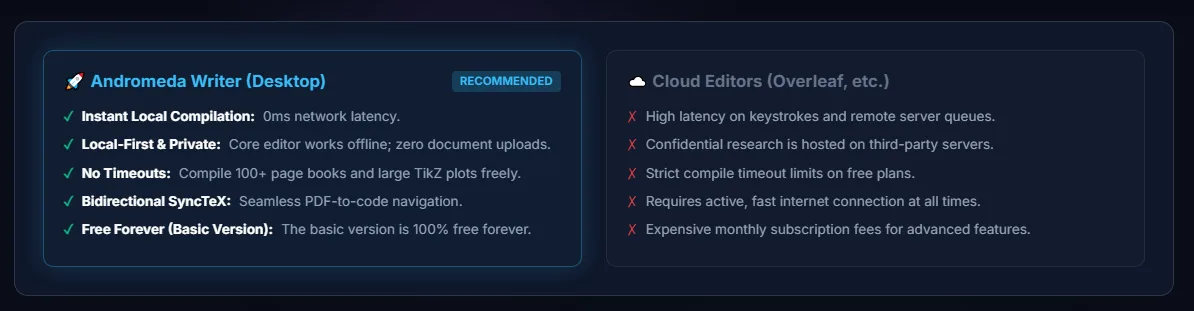
Feature comparison matrix
| Feature | Andromeda Writer | Overleaf | Why it matters |
|---|---|---|---|
| Compilation model | 100% offline local TeX compilation using native pdflatex, xelatex, and lualatex on your own hardware | Cloud-based compilation requiring an active internet connection | Local compilation removes server queues and build limits entirely. |
| Compile timeout limits | No build time caps or server queues | 10-second cap on the Free tier and 240-second cap on paid plans | Long or complex documents may hit Overleaf's time limits. |
| Editor | Monaco editor with code folding, autocomplete for 1,500+ LaTeX commands, and bidirectional SyncTeX jumping | Visual Editor and Code Editor with no downloads or setup required | Overleaf offers a visual editor mode for users new to LaTeX. |
| Math preview | Real-time inline KaTeX equation previews on hover | Compile-based preview of rendered output | Inline hover previews avoid a full compile cycle to check an equation. |
| Data privacy | All .tex files, figures, datasets, and API keys stay on your local drive | Projects are stored and compiled on Overleaf's cloud servers | Local storage suits confidential or embargoed drafts. |
| AI architecture | Bring-your-own-key Google Gemini API for error fixes, section drafting, peer-review simulation, and BibTeX generation | Built-in AI features subject to daily AI allowance caps | BYOK avoids recurring SaaS token markups and daily caps. |
| Collaboration | Local-first workflow; no cloud real-time collaboration described | Real-time collaboration with 1 collaborator per project on Student Free, 10 on Standard | Overleaf is built around shared cloud projects. |
| Templates and setup | Local editor setup on your own machine | No downloads or setup, with hundreds of LaTeX templates | Overleaf's hosted templates lower the barrier for new users. |
| Publication focused AI features | AI Writer, AI Cite, and AI Review are unique features for academic paper writing | No such features specified | It is more helpful for research |
| AI Chatbot | Present | Present | Get it at lower pricing |
Why buyers switch from Overleaf to Andromeda Writer
Overleaf built its reputation on one genuinely useful idea: put LaTeX in a browser tab so nobody has to install a TeX distribution before writing a paper. That idea carried the product to a large audience — the site states that over 30 million users at research institutions and businesses worldwide use it. But the browser-first architecture that made Overleaf accessible also imposes a set of constraints that become painful once you are writing something long, something confidential, or something on a deadline. Andromeda Writer is built around the opposite bet: compile on your own machine, keep your files on your own disk, and use your own AI key. Here are the concrete reasons teams move.
1. Compilation happens on your hardware, not in a server queue
Every Overleaf build is a cloud job. That means an active internet connection is mandatory, and it means your document waits behind whatever else the infrastructure is processing. Overleaf caps compilation at 10 seconds on its Free tier and 240 seconds on paid plans. For a short article that ceiling never matters. For a dissertation with a large bibliography, dozens of TikZ figures, or a multi-file book project, a 240-second cap is a real wall — and the 10-second Free tier cap is a wall you hit constantly. Andromeda Writer runs native pdflatex, xelatex, and lualatex directly on your hardware, so there are no server queues and no build time caps. A compile that takes four minutes simply takes four minutes and finishes.
2. Confidential and embargoed drafts never leave your drive
Cloud editors require you to upload every .tex file, every figure, every dataset, and — if you use integrated AI features — potentially sensitive prompt content. For industry research groups, patent counsel, clinical teams, and anyone working under embargo, that upload is a compliance conversation, not a convenience. Andromeda Writer keeps manuscripts, figures, datasets, and API keys strictly on your local drive. There is no third-party server holding a copy of your draft.
3. AI assistance runs on your own key instead of a metered allowance
Overleaf bundles AI features into its plans, which means the vendor controls the daily allowance and the token economics. Andromeda Writer uses a bring-your-own-key (BYOK) architecture: you connect your personal Google Gemini API key, and the editor uses it for compilation error fixes, section drafting, double-blind peer-review simulation, and BibTeX generation. You are not buying marked-up tokens from a SaaS vendor, and you are not stopped mid-task by a daily cap set by someone else.
4. The editor is built for large multi-file projects
Andromeda Writer ships a Monaco-based editor with code folding, autocomplete for more than 1,500 LaTeX commands, bidirectional SyncTeX jumping, and inline KaTeX equation previews on hover. Because the editor and the compiler live on the same machine, there are no network round-trips between typing and seeing a rendered equation — a meaningful difference when you are editing a 300-page project with dozens of included files.
Feature deep-dive: offline local TeX compilation and the end of build timeouts
The single largest architectural difference between these two products is where the compiler runs. Overleaf compiles in the cloud. Andromeda Writer compiles locally. That one decision cascades into everything else — reliability, privacy, cost structure, and what happens when your document gets big.
What "local compilation" actually means
Andromeda Writer invokes native pdflatex, xelatex, and lualatex distributions installed on your own hardware. The same engines that produce journal-ready PDFs from a terminal produce them here, with the same package ecosystem and the same output fidelity. There is no translation layer, no sandboxed subset of TeX, and no vendor-side restriction on which packages you load. If your project depends on a niche package or a custom class file your department maintains, it compiles the way it compiles on your laptop — because it is compiling on your laptop.
Why the timeout caps matter more than they look
Overleaf's published limits are 10 seconds on the Free tier and 240 seconds on paid plans. Those numbers look generous until you consider what eats compile time: heavy TikZ or PGFPlots figures, large glossaries and indexes requiring multiple passes, big bibliographies processed with BibTeX or Biber, and multi-file books where every chapter pulls in its own assets. A document that needs three passes to resolve cross-references can consume the entire Free tier budget on a single build. On paid plans, a 240-second cap turns into a hard failure at the worst possible moment — typically the night before a submission deadline. Andromeda Writer has no build time caps and no server queues, so a long compile completes rather than aborting.
Working without a connection
Cloud compilation requires an active internet connection for every build. That is fine in an office and awkward on a train, on a flight, in a lab with restricted network access, or during an institutional outage. Local compilation removes the dependency entirely: the editor, the compiler, and your files are all present on the machine. You can draft, compile, and review a full PDF with the network adapter disabled.
Where the cloud still has an argument
Honesty matters here. A cloud compiler means you never install or maintain a TeX distribution, and it means a collaborator on a Chromebook can open your project with zero setup. Overleaf's "no downloads, no setup, and no need to know LaTeX before you start" pitch is real value for a first-time author. Andromeda Writer assumes you are willing to run a local TeX installation. For teams that already have TeX Live or MiKTeX deployed, that assumption costs nothing. For a team starting from zero, it is a one-time setup task — covered in the migration section below.
Feature deep-dive: privacy, BYOK AI, and the Monaco editing experience
The second major differentiator is the combination of local data residency and a bring-your-own-key AI layer, wrapped in an editor designed for large projects. These are three separate features that reinforce each other.
Data residency as a default, not an add-on
With Andromeda Writer, every .tex file, figure, dataset, and API key stays on your local drive. Nothing is uploaded to a third-party cloud server as a condition of editing. For a university group working with human-subjects data, an industry lab under NDA, or a legal team handling patent drafts, this changes the review burden substantially: there is no vendor to add to a data-processing agreement for the manuscript content itself. Overleaf, by design, stores your projects on its servers — that is what makes browser-based collaboration work, and it is also why some organizations route certain drafts elsewhere.
BYOK AI: your key, your allowance, your cost
Andromeda Writer connects directly to your personal Google Gemini API key. That single connection powers four distinct workflows: automated fixes for compilation errors, AI-assisted section drafting, a double-blind peer-review simulation that critiques your draft before a reviewer does, and BibTeX generation from reference material. Because the key is yours, the usage allowance is set by your own Google account rather than by a SaaS vendor's daily cap, and you pay Google's API rates directly instead of a subscription markup on tokens. Teams that already have a Gemini key configured can be productive immediately; teams that do not can create one in the Google AI Studio console.
Monaco, SyncTeX, and KaTeX hover previews
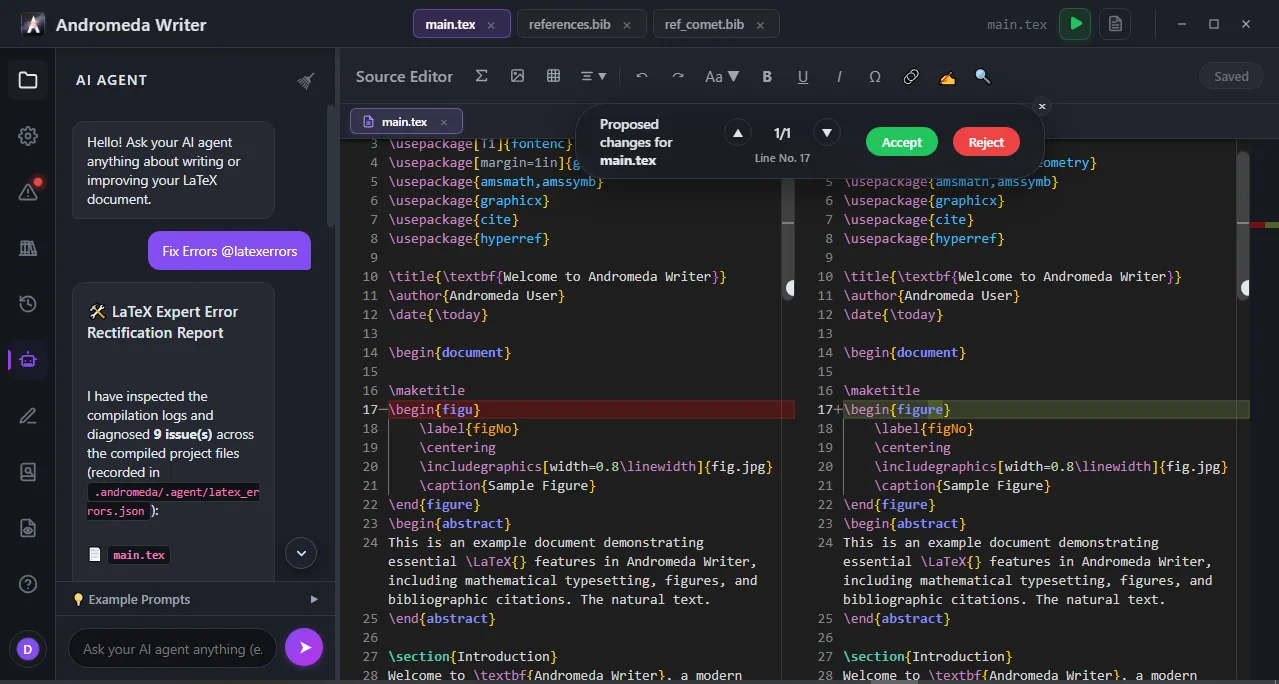
The editor is built on Monaco — the same editing component that powers VS Code — which brings code folding, multi-cursor editing, and fast navigation to large files. Autocomplete covers more than 1,500 LaTeX commands, so environment names, package options, and math macros complete as you type. Bidirectional SyncTeX jumping lets you move from a spot in the PDF back to the exact source line and forward again, which is the difference between a five-second fix and a five-minute hunt through chapter files. Inline KaTeX previews render equations on hover, so you can verify a matrix or a aligned environment without triggering a full compile. Because everything is local, none of these interactions wait on a network round-trip.
What Overleaf offers on the same axes
Overleaf provides a Visual Editor and a Code Editor, real-time collaboration, version control, and hundreds of LaTeX templates, plus AI features bundled into its plans. Its collaboration model is genuinely strong: multiple authors editing one project in a browser with tracked changes is a workflow Andromeda Writer's local-first design does not replicate in the same way. The trade is straightforward — cloud-native collaboration versus local compilation, local data, and a self-managed AI key.
Pricing compared
The two products use different pricing logics, and comparing them requires care about what is mandatory versus optional.
Overleaf's published plans
Overleaf publishes a Student Free plan at $0/month, available to students currently enrolled at a degree-granting institution, which includes 1 collaborator per project. Free sign-up is also available from the homepage. Beyond that, the Standard plan is listed at $16.75/month billed annually ($199/year) or $25/month, and includes 10 collaborators per project. The Pro plan is listed at $33.25/month billed annually ($399/year) or $45/month. Overleaf also advertises a 40% academic discount available to groups at degree-granting institutions, an extra 10% on group licenses, and volume tiers from 1 user up to 20 users, with 20+ users directed to contact sales for the best discounts. A 7-day free trial gives full access to the chosen plan, with the card charged at the end of the trial unless cancelled beforehand.
Andromeda Writer's published plans
Andromeda Writer lists a free tier at $0/month covering unlimited local compilation, free forever. Its Pro tier is $9.99/month and its Premium tier is $19.99/month. Those are the figures the product publishes; anything beyond them is pricing not public.
Reading the comparison correctly
Two cautions apply. First, Overleaf's $0 Student Free plan is restricted to enrolled students at degree-granting institutions — it is not a general free tier for industry teams, and its 1-collaborator-per-project limit is narrower than the paid plans. Second, Andromeda Writer's free tier covers compilation specifically; the AI workflows depend on your own Gemini API key and therefore on Google's API pricing, which is a separate cost from the Andromeda Writer subscription. That is an optional usage cost tied to a key you control, not a mandatory subscription — and it should not be lined up against Overleaf's subscription as if the two were the same kind of charge. On the subscription line itself, Andromeda Writer's Pro at $9.99/month sits below Overleaf's Standard at $16.75/month annual or $25/month, and its Premium at $19.99/month sits below Overleaf's Pro at $33.25/month annual or $45/month. The maker's stated positioning is 40% to 70% lower pricing, with free-forever local compilation.
Who this is actually for
Scenario A: the dissertation writer with a 300-page multi-file project
Picture a doctoral candidate in applied mathematics whose thesis is split into eight chapter files, pulls in 60 TikZ figures, and runs a glossary plus a 400-entry bibliography. Every full build needs multiple passes. On a cloud editor with a 240-second cap, that build is a coin flip, and on the Free tier's 10-second cap it is simply impossible. With local compilation, the build runs as long as it runs. The candidate gets Monaco's code folding for navigating long chapter files, autocomplete across 1,500+ LaTeX commands for the macros they keep forgetting, and bidirectional SyncTeX to jump from a misaligned figure in the PDF straight to the source line. The KaTeX hover preview catches a broken matrix before a full compile is even needed. This is the core Andromeda Writer user: someone whose document outgrew a browser tab.
Scenario B: the industry research group under NDA
Consider a materials science team at a company preparing a patent-adjacent manuscript and an internal technical report. Legal has flagged that drafts cannot be uploaded to third-party cloud servers without a lengthy review. Andromeda Writer keeps every .tex file, figure, dataset, and API key on local drives, so the manuscript never leaves the organization's hardware. The team's existing Gemini API key — already provisioned through the company's Google Cloud account — powers compilation error fixes and BibTeX generation without a new vendor relationship for AI tokens. Cost planning is simple: $9.99/month per seat on Pro, or $19.99/month on Premium, with no per-collaborator math to model. The trade-off the team accepts is that real-time multi-author editing in a shared browser session is not the workflow here; drafts move through the organization's own file-sharing and version-control practices.
Scenario C: the cost-conscious department migrating a cohort
A department administrator supporting 20 researchers compares renewal costs. Overleaf's Standard at $16.75/month annual works out to $199/year per seat before any academic discount, and Pro at $33.25/month annual is $399/year per seat. The department is eligible for Overleaf's advertised 40% academic discount and the extra 10% on group licenses, which changes the math considerably — this is exactly the scenario where Overleaf's institutional pricing is strongest, and it deserves a real quote rather than a list-price comparison. Against that, Andromeda Writer's Pro at $9.99/month and Premium at $19.99/month are straightforward per-seat numbers with no volume tiers published. The department's decision usually turns on two questions: how many seats actually need cloud collaboration, and how many just need a fast, private LaTeX editor. The second group is where local compilation pays for itself immediately.
Getting started with Andromeda Writer
Migration is mostly about getting a working TeX distribution in place and pointing the editor at your existing project. The steps below assume you are coming from an Overleaf project you can download as a ZIP.
Install a local TeX distribution. Andromeda Writer invokes native pdflatex, xelatex, and lualatex, so a full TeX Live (Linux/macOS) or MiKTeX (Windows) installation is the prerequisite. Choose the full scheme rather than a minimal one if your project uses TikZ, glossaries, or custom classes — missing packages are the most common first-run failure.
Download your Overleaf project as a ZIP. From your Overleaf project menu, export the source archive. Unzip it to a folder on your local drive. Keep the folder structure intact; relative paths to figures and included chapter files must survive the move.
Open the project root in Andromeda Writer. Point the editor at the directory containing your main .tex file. Confirm the root document is set correctly if your project uses \include or \input across subdirectories.
Run a first local compile and fix package gaps. Trigger a build with your target engine — pdflatex for most journal classes, xelatex if you rely on fontspec or Unicode math, lualatex for Lua-dependent packages. If the log reports missing .sty files, install them through your distribution's package manager and rebuild.
Connect your Google Gemini API key. Create or retrieve a key in Google AI Studio, then add it in Andromeda Writer's settings. The key stays on your local drive. Once connected, use the AI error-fix workflow on any remaining compile failures, and try the peer-review simulation on a finished section to get a critique before submission.
Verify SyncTeX and set up your review loop. Test bidirectional jumping between PDF and source on a figure-heavy page. Confirm KaTeX hover previews render for your custom math macros. Then establish a local backup habit — a Git repository or your organization's sync tool — since the files now live on your machine rather than a vendor's servers.
Teams that want a side-by-side view of how these two products and their alternatives stack up can browse the comparisons on AltHunt before committing a cohort to either platform.
\documentclass[12pt,a4paper]{article}
\usepackage{amsmath, amssymb}
\begin{document}
\section*{Quantum Harmonic Oscillator}
Andromeda Writer renders inline KaTeX previews on hover and compiles locally with zero timeout limits:
\begin{equation}
\hat{H}\psi_n(x) = \left( -\frac{\hbar^2}{2m}\frac{d^2}{dx^2} + \frac{1}{2}m\omega^2 x^2 \right)\psi_n(x) = \hbar\omega\left(n + \frac{1}{2}\right)\psi_n(x)
\end{equation}
\end{document}
Pricing breakdown
| Plan | Andromeda Writer | Overleaf |
|---|---|---|
| Free tier | $0/month — unlimited local compilation, free forever | $0/month Student Free plan (for students at degree-granting institutions); free sign-up also available |
| Entry paid | Pro — $9.99/month | Standard — $16.75/month billed annually ($199/year) or $25/month |
| Top paid | Premium — $19.99/month | Pro — $33.25/month billed annually ($399/year) or $45/month |
| Trial | Free 48hr Premium features + forever compilation tier ( Basic) available | 7-day free trial with full access to the chosen plan |
| Discounts | pricing not public | 40% academic discount for groups at degree-granting institutions; extra 10% on group licenses |
Illustrative pricing — verify current figures before relying on this.
Ready to try Andromeda Writer?
Visit andromedawriter.comMore alternatives
All Overleaf alternativesCommunity Discussions & Reviews
Real feedback from verified buyers, founders, and engineering teams using these products.