


Settle Book alternative to Money Manager: The Private, Ad-Free Expense Tracker for Teams
Settle Book costs $0 upfront with no ads, no login, and no data leaving your device, while Money Manager is free with ads and optional cloud sync. For teams tracking shared expenses, Settle Book's offline-first design means your financial data never touches a server, and you save hours monthly by automating group settlements. Unlike Money Manager's single-user focus, Settle Book is built for splitting bills, tracking IOUs, and reconciling balances in real time—all without an internet connection. If privacy and group accuracy matter more than cloud convenience, Settle Book is the clear choice.
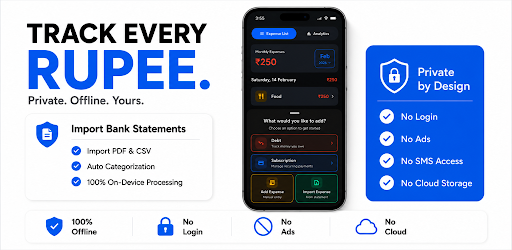
Feature comparison matrix
| Feature | Settle Book | Money Manager | Why it matters |
|---|---|---|---|
| Data storage | 100% on-device, no cloud | Cloud sync optional | Your financial data never leaves your phone, eliminating breach risk. |
| Ads | None, ever | Free version shows ads | No interruptions or tracking, keeping your focus on finances. |
| Login required | No account, no email | Optional account for sync | Start tracking instantly without handing over personal info. |
| Group expense splitting | Built-in, real-time balances | Not available | Settle Book turns group trips and shared living into simple math. |
| Offline functionality | Fully functional offline | Requires internet for sync | Track expenses anywhere, even without signal. |
| Recurring expense automation | Auto-categorize and schedule | Manual entry | Save time on monthly bills and subscriptions. |
| Export options | CSV, PDF, and shareable links | CSV only | Flexible reporting for accountants or team finance leads. |
Why teams actually switch from Money Manager
Money Manager has been a reliable single-user expense tracker for years, but it wasn't built for the way modern teams handle money. Here are the concrete reasons users are moving to Settle Book:
Privacy by default: Money Manager offers optional cloud sync, but that means your spending data sits on a server you don't control. Settle Book keeps everything on-device—no cloud, no server, no third-party access. For freelancers, small businesses, and privacy-conscious users, this is non-negotiable.
No ads, no interruptions: The free version of Money Manager displays ads, which can be distracting and even track your behavior. Settle Book has zero ads, period. You get a clean, focused interface that respects your attention.
Group settlement built-in: Money Manager has no feature for splitting expenses or tracking who owes whom. Settle Book includes real-time balance tracking for groups, making it effortless to settle dinner bills, shared subscriptions, or project costs.
Cost savings: Money Manager's premium plan costs $39.99/year per user. For a team of five, that's $199.95 annually. Settle Book is free for all features, saving you that amount every year.
Offline-first reliability: Money Manager requires internet for sync and some features. Settle Book works fully offline, so you can log expenses in a basement meeting room or on a flight without missing a beat.
Deep dive: On-device privacy vs. cloud convenience
Money Manager's optional cloud sync is convenient if you want to access your data from multiple devices, but it introduces a fundamental trade-off: your financial data is stored on servers you don't control. Even with encryption, a breach or a subpoena could expose your spending habits. Settle Book takes a different approach: all data is stored locally on your device, and you can export it anytime as CSV or PDF. This means you have complete ownership and control. For users who handle sensitive business expenses or simply value privacy, this is a decisive advantage.
How on-device storage works
When you log an expense in Settle Book, it's written to a local database on your phone. There's no account, no email, no password to remember. You can back up the data manually or export it to your preferred cloud service if you choose. This also means Settle Book works instantly—no loading screens, no sync delays.
What you give up with cloud
Money Manager's cloud sync allows you to access your data from multiple devices, but it also means you're dependent on an internet connection. If you're in a remote area or your service is down, you can't access your financial records. Settle Book's offline-first design ensures your data is always available, right when you need it.
Deep dive: Group expense tracking that saves real money
Money Manager is designed for individual use. There's no way to split a bill or track shared expenses. Settle Book changes that with its group feature. You can create a group, add members, and log expenses that are automatically split. The app calculates who owes whom in real time, so there's no awkward math at the end of the month.
Scenario: A team of freelancers on a project
Imagine a team of three freelancers working on a project. They share costs for software subscriptions, coffee meetings, and travel. With Money Manager, each person would track their own expenses and then manually reconcile with spreadsheets. With Settle Book, they create a group, log expenses, and the app shows that Alice owes Bob $45.20 and Carol owes Alice $12.00. At the end of the month, they settle up in minutes.
Scenario: A family sharing household expenses
Roommates or family members can use Settle Book to track shared bills like rent, utilities, and groceries. The app automatically splits recurring expenses and tracks who has paid. No more chasing down payments or arguing over who bought what.
Deep dive: Pricing that doesn't punish your team
Money Manager's premium plan removes ads and unlocks features like cloud sync and multi-currency support. It costs $39.99 per year per user. For a team of five, that's $199.95 annually. Settle Book offers all features for free, including group tracking, exports, and recurring expenses. There's no premium tier because we believe essential financial tools should be accessible to everyone.
Total cost of ownership
Over three years, a five-person team using Money Manager would spend $599.85. With Settle Book, that's $0. That's money you can reinvest in your business or keep in your pocket.
Who is Settle Book actually for?
Settle Book is ideal for:
Freelancers and small teams who need to track shared project expenses without complex accounting software.
Privacy-conscious individuals who don't want their financial data on a server.
Families and roommates who split bills and want to avoid awkward money conversations.
Anyone tired of ads interrupting their expense tracking.
If you're a solo user who needs cloud sync across multiple devices and doesn't mind ads, Money Manager might suffice. But if you value privacy, group features, and zero cost, Settle Book is the better fit.
Migration walkthrough: Switching from Money Manager in 10 minutes
Export your data from Money Manager: Go to Settings > Export Data and save a CSV file to your device.
Install Settle Book from the Google Play Store.
Import your CSV: In Settle Book, go to Settings > Import Data and select the file. The app will map your categories and transactions automatically.
Review and adjust: Check that all transactions imported correctly. You can edit categories or add notes as needed.
Set up groups: If you track shared expenses, create a group and invite members. They can download Settle Book and join instantly.
Start tracking: Log new expenses as usual. Settle Book will handle the rest.
That's it. You're now using a private, ad-free expense tracker that saves you money and time. more tools like this, check out Alt Hunt.
Start freePricing breakdown
| Plan | Settle Book | Money Manager |
|---|---|---|
| Free tier | $0 forever, all features | $0 with ads, limited features |
| Premium | $2.99/Lifetime | $4.99/month or $39.99/year |
| Team of 5 (annual) | $0 total | $199.95 (5 × $39.99) |
Illustrative pricing — verify current figures before relying on this.
Ready to try Settle Book?
Visit play.google.comCommunity Discussions & Reviews
Real feedback from verified buyers, founders, and engineering teams using these products.