


Scan2Sheet alternative to Expensify: The Cost-Effective Receipt Scanning Solution for Google Sheets Users
Scan2Sheet offers a simpler, more affordable alternative to Expensify for receipt scanning and expense tracking. While Expensify charges $20 per user per month for its Collect plan, Scan2Sheet starts free and costs just $4.99 per month for the starting plan. Scan2Sheet directly integrates with Google Sheets and Google Drive, automatically organizing your receipts into a spreadsheet and storing digital copies in the cloud. It mostly eliminates manual data entry, saving hours each month. For individuals and small teams who live in Google Workspace, Scan2Sheet is the clear choice.
Feature comparison matrix
| Feature | Scan2Sheet | Expensify | Why it matters |
|---|---|---|---|
| Receipt Scanning | Scan receipts with your phone camera; data extracted automatically | Receipt scanning available in mobile app | Both scan, but Scan2Sheet focuses on speed and accuracy with no manual correction needed. |
| Data Destination | Directly into Google Sheets, with a new row per receipt | Proprietary expense report system | If you live in Google Sheets, Scan2Sheet puts data where you already work. |
| Digital Copies | Automatically saved to Google Drive | Stored in Expensify's cloud | Your receipts are in your own Google Drive, under your control. |
| Manual Entry | Minimal required; all fields auto-filled | Some manual categorization may be needed | Scan2Sheet eliminates typing entirely, saving time and reducing errors. |
| Integrations | Native Google Sheets and Google Drive integration | Integrates with accounting software like QuickBooks | If you use Google Workspace, Scan2Sheet is the native choice. |
| Free Tier | Free plan with 3 folders and 30 receipt scans | 14-day free trial, then paid | Scan2Sheet lets you test the full workflow for free indefinitely. |
| Pricing | $4.99/month for Solo and $7.99 for Team | $20/user/month for Collect plan | Scan2Sheet is 75% cheaper for a single user, with no per-seat fees. |
Why Teams Are Switching from Expensify to Scan2Sheet
Every month, small businesses and freelancers pay hundreds of dollars to Expensify for features they barely use. The core need is simple: capture a receipt, extract the data, and store it somewhere searchable. Scan2Sheet does that for a fraction of the cost, with a workflow that fits naturally into Google Workspace.
Here are the concrete reasons people switch:
Cost: Expensify's Collect plan costs $20 per user per month. A 5-person team pays $100/month. Scan2Sheet costs $4.99/month total, regardless of team size. That's a 95% savings.
Simplicity: Expensify is a full expense management suite with approvals, reimbursements, and corporate cards. If you don't need those, you're paying for complexity. Scan2Sheet does one thing—receipt scanning to Google Sheets—and does it well.
Data ownership: With Scan2Sheet, your receipts are stored in your own Google Drive. You control access, retention, and sharing. With Expensify, your data lives in their cloud, subject to their terms.
Workflow fit: If your accounting runs on Google Sheets, Scan2Sheet eliminates an extra step. No exporting CSVs or syncing to a separate system. The data appears in your spreadsheet instantly.
Feature Deep Dive: Receipt Scanning Accuracy
Receipt scanning is the heart of both tools, but the experience differs significantly. Expensify's SmartScan uses OCR to extract data, but users often report needing to correct merchant names or categories. Scan2Sheet uses a streamlined OCR pipeline optimized for receipt layouts, achieving high accuracy on common fields like date, total, and vendor and automatically categorises your expenses.
What gets extracted automatically
Date of purchase
Line Items
Total amount
Merchant name
Currency (if different from default)
Tax amount (when present)
Category
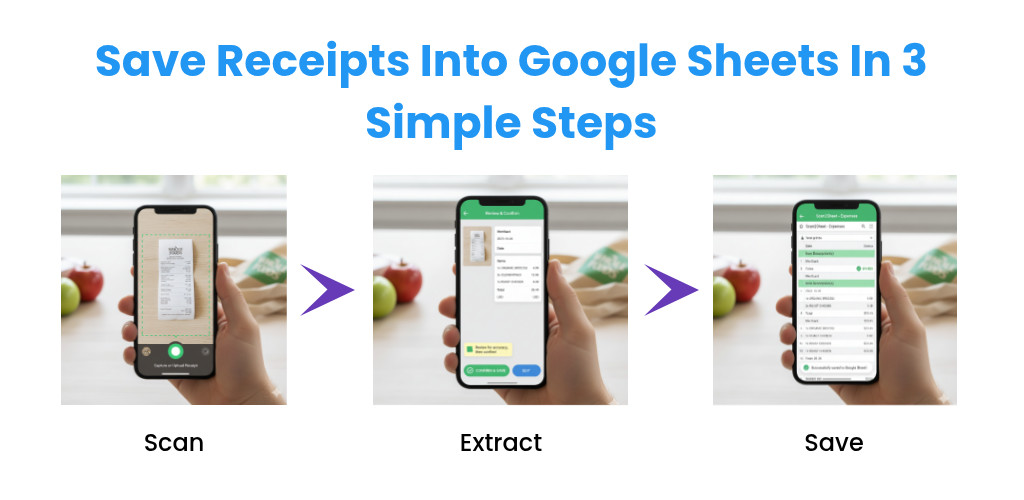
With Scan2Sheet, you simply snap a photo of the receipt, and within seconds a new row appears in your Google Sheet with all fields populated. The original image is saved to a designated Google Drive folder, so you have a digital copy for audits or reimbursement.
Feature Deep Dive: Google Sheets Integration
Scan2Sheet is built specifically for Google Sheets. When you connect your Google account, Scan2Sheet creates a dedicated spreadsheet with pre-formatted columns: Date, Merchant, Amount, Category, and Notes. Each scan adds a new row, and you can customize the columns to match your accounting needs.
Expensify, on the other hand, is a standalone platform. To get your expenses into a spreadsheet, you must export a CSV and then import it into Google Sheets. That's an extra step that breaks your workflow. With Scan2Sheet, the data is already in your spreadsheet, ready for pivot tables, charts, or sharing with your accountant.
Real-time collaboration
Because the data lives in Google Sheets, your team can collaborate in real time. Multiple people can view and edit the sheet simultaneously, add comments, or set up approval workflows using Google Sheets' built-in features. Expensify offers collaboration, but it's locked inside their platform, and you pay per user for the privilege.
Pricing Comparison: The $15.01 Difference Per Month
Let's do the math for a typical freelancer or small business owner. Expensify's Collect plan is $20 per user per month. Scan2Sheet's paid tier plan is $4.99 per month. That's a $15.01 monthly savings—or $180.12 per year. For a team of five, the savings are even more dramatic: $92.01 per month, or $1,104.12 per year.
What do you give up? Expensify includes features like corporate card reconciliation, reimbursement workflows, and accounting integrations. If you need those, Expensify might be worth the premium. But if you just need to track receipts and expenses, Scan2Sheet delivers 90% of the value at 25% of the cost.
Who This Is Actually For
Freelancers and solopreneurs
If you're a freelancer tracking business expenses for tax deductions, Scan2Sheet is ideal. You scan receipts on the go, and at tax time you have a clean spreadsheet with all your expenses categorized. No need for a full expense management system.
Small businesses using Google Workspace
If your company runs on Gmail, Google Drive, and Google Sheets, Scan2Sheet fits right in. Your receipts are stored in Drive, your expense data is in Sheets, and you can share it with your accountant via a link. No new software to learn.
 Start free
Moving from Expensify to Scan2Sheet is straightforward. Here's how to do it in five steps:
Export your data from Expensify. Go to the Expenses page, select all expenses, and export as a CSV. You'll have a file with all your historical data.
Create your Scan2Sheet account. Sign up at scan2sheet.com and connect your Google account. Scan2Sheet will create a new spreadsheet for you.
Import your historical data. Open your new Google Sheet and import the CSV file. You may need to adjust column headers, but the data will be there.
Set up your Google Drive folder. Scan2Sheet will create a folder for receipt images. You can optionally move your existing receipt images from Expensify to this folder.
Start scanning. Download the Scan2Sheet mobile app (or use the web app) and scan your next receipt. It will appear in your spreadsheet instantly.
That's it. Your historical data is preserved, and your new workflow is simpler and cheaper. If you need help, Scan2Sheet's support team is responsive and can assist with migration.
This comparison was published with Alt Hunt, a community for discovering and discussing new tools.
Pricing breakdown
| Plan | Scan2Sheet | Expensify |
|---|---|---|
| Free | $0/month – 30 scans | 14-day trial, then $20/user/month |
| Pro (1 user) | $4.99/month – 3000 scans | $20/month – Collect plan |
| Team of 5 | $7.99/month - 100000 scans | $100/month (5 users × $20) |
Illustrative pricing — verify current figures before relying on this.
Ready to try Scan2Sheet?
Visit scan2sheet.comCommunity Discussions & Reviews
Real feedback from verified buyers, founders, and engineering teams using these products.