

Whenever (by Wix) alternative to Relevance AI: Stop Paying Your Agent to Rediscover the Same Workflow
Whenever (by Wix) and Relevance AI differ in what they run. Whenever builds workflows from plain-language descriptions: AI writes the workflow once, then code executes it, so fixed logic with the same inputs produces the same output, and an agent step runs only where you add one. It includes 1,400+ integrations, any API with docs, and per-run billing. The Hobby plan is $0 with 100 runs/month; Pro is $39/month (or $29/month billed yearly) with 10,000 runs/month. Relevance AI is an agent platform where agents decide how to use tools, with a no-code tool builder, workforces, and human approvals. Run defined procedures as code and hand only the judgment calls to an agent step, in the same workflow.
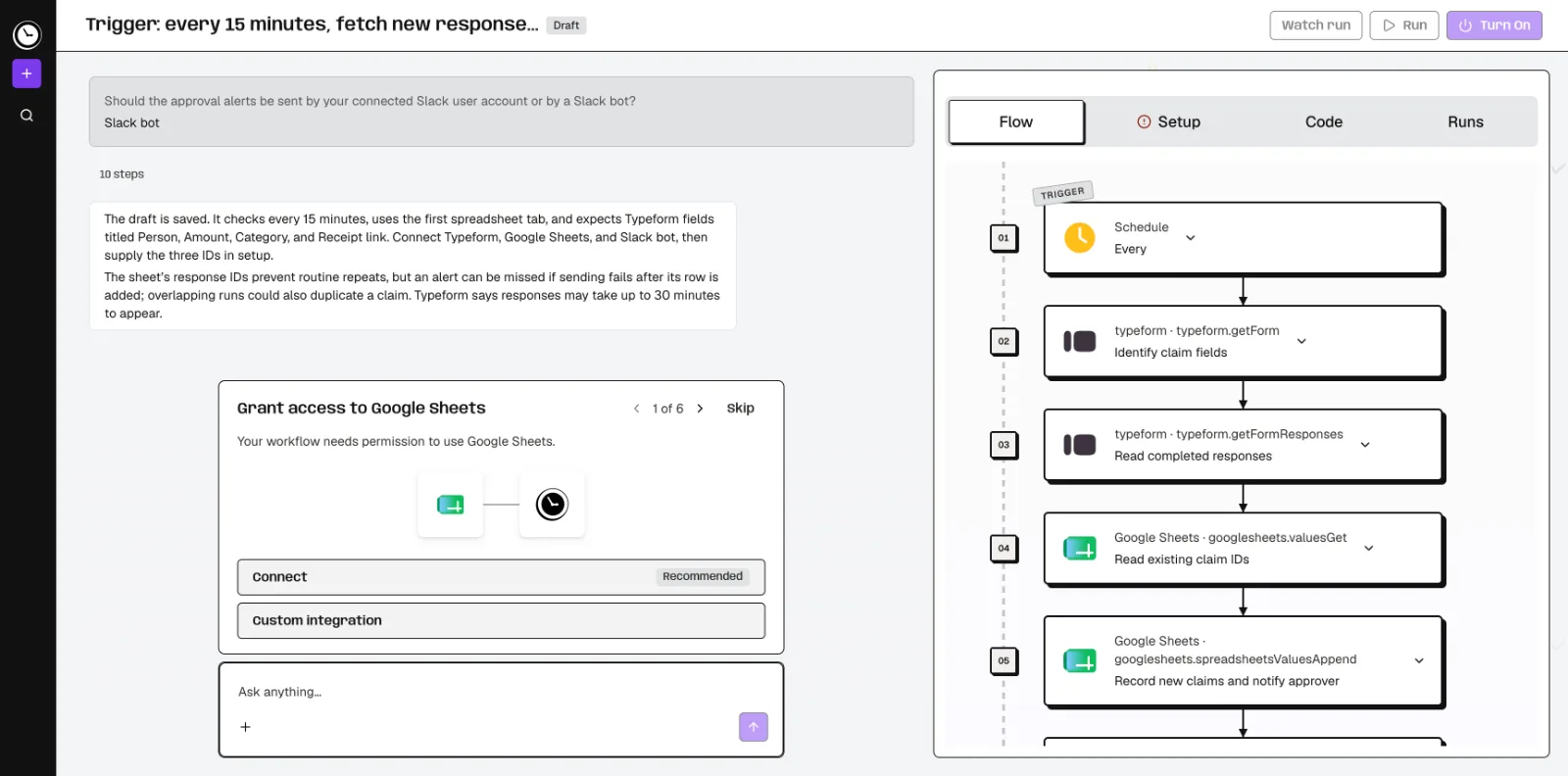
Feature comparison matrix
| Feature | Whenever (by Wix) | Relevance AI | Why it matters |
|---|---|---|---|
| Execution model | AI writes it once, then code runs it. Code steps give the same output for the same input; AI steps and agent loops can vary. | Agents decide how to use tools at runtime; tool-to-tool connections can run without an agent. | Fixed code steps give repeatable results for defined procedures. |
| Building method | Describe the job in plain words; AI builds the workflow and asks about business rules. Also build over MCP from Cursor, Claude Code, or Codex. | No-code tool builder with API and Python steps; agents and workforces configured in the platform. | Plain-language building lowers the barrier for non-developers. |
| Integrations | 1,400+ integrations plus any API with docs. | No-code tool builder with API and Python steps. | Broad native integrations reduce custom connector work. |
| Triggers | Schedules, webhooks, app events or on demand. | Agent triggers. | Multiple trigger types cover scheduled and event-driven jobs. |
| Logging & history | Every run and step logged (7 days on Hobby, 30 on Pro), with an email when a run fails. | Task history and agent version history are available. | Step-level logs help debug and audit each run. |
| Judgment and approvals | Agent steps with the tools you give them and a capped number of turns, next to fixed steps; business rules captured while building. | Human approvals and escalations in workforces. | Approvals matter when a person must sign off mid-process. |
| Billing unit | Per run, not per step; AI building is free within weekly usage limits. | An Action is counted each time a tool runs (including failed runs), plus Vendor Credits for LLM and tool costs; bring your own API keys to bypass Vendor Credits. | Per-run billing is easier to forecast for multi-step workflows. |
| Portability | Each workflow is an exportable, readable TypeScript module. | Data exports as CSV, Excel, or JSON; managed deployment uses a selected region. | Exportable code supports code review and version control. |
Why buyers actually switch from Relevance AI to Whenever (by Wix)
Teams move from Relevance AI to Whenever (by Wix) for concrete, operational reasons. Here are the ones that come up most often.
Deterministic execution for defined procedures. Whenever's AI writes the workflow once, then code runs it. For fixed, non-AI logic with the same inputs and dependencies, the published code runs the same way every time. Optional AI steps let you insert a model call at a specific point without making the whole workflow non-deterministic. Relevance AI's agents decide how to use tools at runtime. For a procedure that must produce the same result every time, such as invoice matching, employee onboarding or weekly report generation, determinism removes a class of variability.
Per-run billing instead of per-action billing. Whenever bills per run, not per step. Relevance AI counts an Action each time a tool runs, directly or via an Agent or Workforce, including failed runs, plus Vendor Credits for LLM and tool costs. A 12-step workflow is one run in Whenever; in Relevance AI it can be multiple Actions. That difference compounds at volume.
1,400+ integrations plus any API with docs. Whenever ships with 1,400+ native integrations and supports any API with documentation. Relevance AI offers a no-code tool builder with API and Python steps. If your stack includes common SaaS tools, Whenever likely has a native connector, which reduces custom tool-building work.
Exportable, readable TypeScript modules. Every Whenever workflow is an exportable TypeScript module. That means code review and version control. Relevance AI exports data as CSV, Excel, or JSON, but exporting data is not the same as moving the agent runtime.
Plain-language building with business-rule clarification. You describe the job in plain words; the AI builds the workflow and asks about business rules. You can also build over MCP from Cursor, Claude Code, or Codex. Relevance AI also offers a no-code tool builder and Invent for building with AI.
Step-level logging with a clear retention window. Whenever logs every run and every step (7 days on Hobby, 30 on Pro), with an email when a run fails. Relevance AI provides task history and agent version history. Step-level logs make debugging a failed run faster because you see exactly which step failed and why.
Deep dive: deterministic workflows vs agent runtime
The core architectural difference is what executes your process. In Whenever, AI builds the workflow and makes runtime decisions only in the steps you hand to it. You describe the job, the AI asks clarifying questions about business rules, and then it generates a workflow. That workflow runs as code. For fixed, non-AI logic with the same inputs and dependencies, it runs the same way every time. Optional AI steps can be inserted where judgment is needed. Whenever runs agents as a step: an agent loop with the tools you give it and a capped number of turns, inside a run of up to an hour, next to fixed steps in the same workflow.
In Relevance AI, agents decide how to use tools at runtime. That is the right model for tasks where the path is not known in advance: research, triage, or multi-step reasoning where the agent chooses the next tool. Relevance AI also supports tool-to-tool connections that can run without an agent, so it is not purely agent-based. But the platform's center of gravity is the agent.
When determinism matters
Consider a finance team reconciling purchase orders. The procedure is fixed: fetch the PO, fetch the invoice, compare line items, flag mismatches, post to the ledger. A deterministic workflow runs that fixed sequence the same way every time, given the same inputs and dependencies. An agent might choose a different tool order or retry differently, which introduces variance. For audit and compliance, variance is a cost.
When agency matters
Consider a support team triaging inbound tickets. The right next step depends on the ticket content. An agent that decides which tool to use can handle that variability. Whenever supports optional AI steps and full agents for these cases, but Relevance AI's agent-first design is built around them. The question is which model dominates your workload.
Deep dive: per-run billing vs per-action billing
Whenever bills per run, not per step. A run is one execution of a workflow, regardless of how many steps it contains. The Hobby plan is $0 with 100 runs/month, 1 active workflow, hourly schedules, and $1 included runtime AI spend. Pro is $39/month or $29/month billed yearly, with 10,000 runs/month, unlimited workflows, every-minute schedules, and $10 included runtime AI spend. AI building is free within weekly usage limits.
Relevance AI counts an Action each time a tool runs, directly or via an Agent or Workforce, including failed runs. On top of Actions, Vendor Credits cover LLM and tool costs. Bringing your own API keys bypasses Vendor Credits. This model aligns cost with tool usage, which can be efficient for lightweight agents but harder to forecast for long workflows.
Forecasting example
Suppose a workflow has 10 tool steps and runs 2,000 times per month. In Whenever, that is 2,000 runs. On Pro at $29/month billed yearly, 10,000 runs are included, so 2,000 runs fit comfortably. In Relevance AI, the same workload could count multiple Actions per execution depending on how tools are invoked, plus Vendor Credits for LLM calls. The exact cost depends on configuration, but the billing unit differs: runs vs actions.
Failed runs
Whenever logs every run and step, and billing is per run. Relevance AI counts an Action including failed runs. If your workflows have a non-trivial failure rate, that difference matters. A failed run in Whenever is still one run; in Relevance AI it can be multiple Actions.
Deep dive: integrations, portability, and building over MCP
Whenever includes 1,400+ integrations plus any API with docs. That breadth means most common SaaS tools connect natively. For tools without a native connector, you can call any API with documentation. Relevance AI's no-code tool builder supports API and Python steps, so custom tools are possible, but you build them yourself.
Exportable TypeScript modules
Each Whenever workflow is an exportable, readable TypeScript module. You can commit it to Git and review it in a pull request. This is a meaningful difference for engineering teams that require code review for production automations. Relevance AI exports data as CSV, Excel, or JSON, but exporting data is not the same as moving the agent runtime.
Building over MCP
Whenever supports building over MCP from Cursor, Claude Code, or Codex. If your developers already work in those environments, they can create and modify workflows without switching tools. For teams that live in an IDE, MCP-based building shortens the loop between idea and deployed workflow.
Triggers and schedules
Whenever supports schedules, webhooks, app events and on-demand triggers. Hobby includes hourly schedules; Pro includes every-minute schedules. Relevance AI supports agent triggers as well.
Who this is actually for
Whenever fits teams that run defined procedures and want rules and results, with optional model steps. It is not an always-on chat agent, so keep those on an agent platform. Here are three concrete scenarios.
Scenario 1: Operations team running recurring back-office workflows
An operations team reconciles invoices, syncs CRM records, and generates weekly reports. These are fixed procedures. They need the same output every time, step-level logs for debugging, and predictable per-run billing. Whenever's deterministic workflows and 1,400+ integrations cover this. Relevance AI could run these as tools, but its agent runtime is more than the job requires.
Scenario 2: Engineering team that requires code review
A platform team wants every automation to go through pull request review. Whenever's exportable TypeScript modules make that possible: the workflow is readable code. Building over MCP from Cursor or Claude Code fits their existing workflow. Relevance AI's no-code builder may suit non-developers, but it is a different fit for a code-review requirement.
Scenario 3: Startup that needs to start free and scale predictably
A startup needs to automate a handful of processes without upfront cost. Whenever's Hobby plan is $0 with 100 runs/month and 1 active workflow. As volume grows, Pro at $29/month billed yearly covers 10,000 runs/month and unlimited workflows. Per-run billing makes forecasting straightforward. Relevance AI's Action-based billing plus Vendor Credits requires more modeling to predict monthly cost.
Migration walkthrough: moving from Relevance AI to Whenever (by Wix)
Migration is straightforward if you follow these steps.
Inventory your Relevance AI agents and tools. List each agent, the tools it calls, its triggers, and whether it uses human approvals or escalations. Note which agents follow a fixed procedure and which genuinely need runtime decisions.
Classify each workflow. Mark fixed-procedure agents as deterministic candidates for Whenever. Mark open-ended agents as candidates to keep on Relevance AI or rebuild as an agent step in Whenever.
Describe each fixed procedure in plain words in Whenever. Start with the highest-volume workflow. The AI will ask about business rules. Answer them explicitly so the generated workflow matches your current logic.
Map integrations. Check that each tool in the Relevance AI agent has a native connector among Whenever's 1,400+ integrations. For tools without one, use the any-API-with-docs path.
Recreate triggers. Set up schedules, webhooks, app events or on-demand triggers to match the original cadence. On Pro, every-minute schedules are available.
Test with real data. Run the workflow on a sample of real inputs and compare outputs to the Relevance AI agent's results. Use step-level logs to verify each step.
Export and review the TypeScript module. Commit the exported module to your repository and run code review. This catches logic gaps before production.
Cut over and monitor. Disable the Relevance AI agent, enable the Whenever workflow, and monitor run logs for the first week. Hobby retains 7 days of logs; Pro retains 30 days.
For teams comparing automation platforms more broadly, this comparison is published with Alt Hunt, which tracks side-by-side tool evaluations.
Pricing breakdown
| Plan | Whenever (by Wix) | Relevance AI |
|---|---|---|
| Free / entry | Hobby: $0, 100 runs/month, 1 active workflow, hourly schedules, $1 included runtime AI spend. | |
| Paid | Pro: $39/month or $29/month billed yearly: 10,000 runs/month, unlimited workflows, every-minute schedules, $10 included runtime AI spend. | |
| 10,000 runs/month | Pro: $39/month, or $29/month billed yearly. | |
| Enterprise | Contact us. |
Illustrative pricing — verify current figures before relying on this.
Ready to try Whenever (by Wix)?
Visit whenever.devCommunity Discussions & Reviews
Real feedback from verified buyers, founders, and engineering teams using these products.