

Whenever (by Wix) alternative to Make.com: Pay per Run, Not per Credit
Whenever (by Wix) starts at $0 for 100 runs per month and $39 per month for 10,000 runs, billing per whole run rather than per operation. Make.com uses a visual canvas and bills in credits, where most non-AI operations cost one credit and AI steps consume variable amounts. Whenever builds workflows from plain-language descriptions, then runs them as exportable TypeScript modules with 1,400+ integrations; code steps give the same output for the same input, while AI steps can vary. Make.com offers a mature visual builder with an AI assistant and JSON blueprint exports. The core difference is the billing unit and the output format.
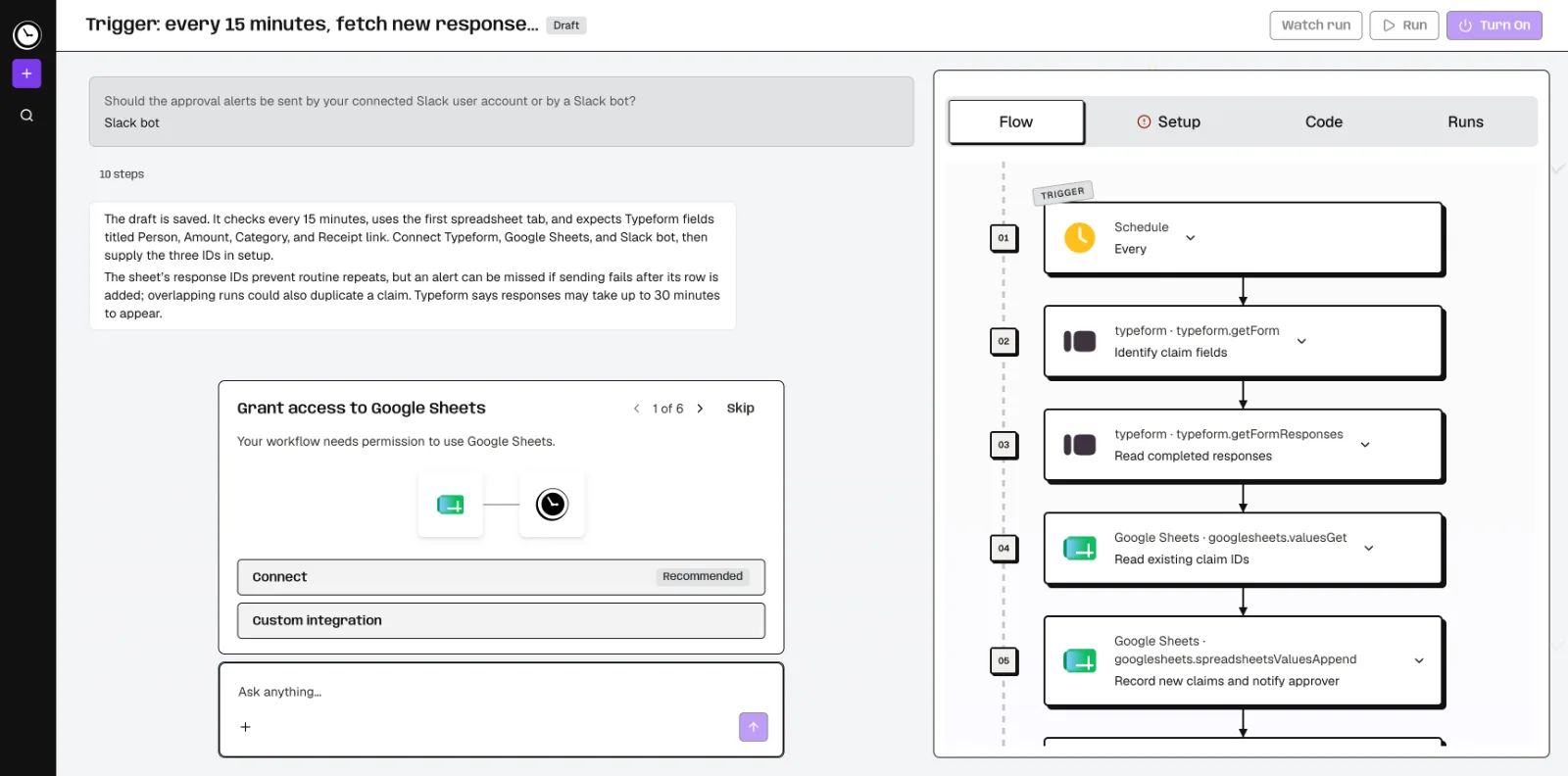
Feature comparison matrix
| Feature | Whenever (by Wix) | Make.com | Why it matters |
|---|---|---|---|
| Building method | Describe the job in plain words; AI builds the workflow and asks about business rules | Visual canvas with modules, routers, and filters; Maia AI assistant can create and modify scenarios from prompts | Both support natural-language building, so the choice comes down to whether you want a canvas or a generated code module. |
| Output format | Each workflow is an exportable, readable TypeScript module | Scenarios export as JSON blueprints; connections must be recreated on import | TypeScript modules are easier to version-control and review in code repositories than JSON blueprints. |
| Billing unit | Per run, regardless of how many steps a run contains | Per credit; most non-AI operations use one credit, AI and some features have variable rates | A different billing unit does not automatically mean a lower bill, but it changes how you forecast costs. |
| Execution model | AI writes it once, then code runs it. Code steps give the same output for the same input; AI steps and agent loops can vary. | Scenario execution with documented history and replay | Deterministic execution matters when auditability and repeatable results are required. |
| Integrations | 1,400+ integrations plus any API with documentation | App modules on the scenario canvas; check coverage for your stack | Both cover common SaaS tools; check your specific stack against each library. |
| Run logging | Every run and step logged (7 days on Hobby, 30 on Pro), with an email when a run fails. | Scenario history and replay documented | Log retention length affects how far back you can debug production issues. |
| Runtime AI cost | AI steps draw on the plan's included AI spend ($1 on Hobby, $10 on Pro) | Built-in AI can have variable credit rates; custom model credentials bill provider tokens separately | Budget AI steps on top of the base billing unit on either platform. |
| Build environment | In the app or over MCP from Cursor, Claude Code, or Codex | Scenario editor, with Maia for prompt-based building | MCP support lets developers build automations without leaving their IDE. |
Why buyers actually switch from Make.com to Whenever (by Wix)
Teams rarely leave a working automation platform on a whim. The switches we see cluster around a handful of concrete, checkable differences between Make.com and Whenever (by Wix). Here are the reasons that come up most often.
Billing unit mismatch. Make.com bills in credits, and most non-AI operations consume one credit, while AI and some features have variable rates. Whenever bills per run, so a 40-step run and a 3-step run cost the same unit. Teams with deep, multi-step scenarios often find the per-run model easier to forecast, even though a different unit does not by itself prove a lower bill.
Output you can put in a repository. Every Whenever workflow is an exportable, readable TypeScript module. Make.com exports JSON blueprints, and connections must be recreated when you import them elsewhere. If your team reviews automations in pull requests, TypeScript modules fit that workflow.
Deterministic execution as the default. For fixed, non-AI logic with the same inputs and dependencies, the published code runs the same way every time. Optional AI steps let you insert a model call at a specific point without making the whole workflow non-deterministic. That matters for finance reconciliations, order routing, and any process where an auditor will ask why a record changed.
Building from the IDE. Whenever supports building over MCP from Cursor, Claude Code, or Codex, in addition to the in-app builder. Developers who already live in an editor can create and adjust workflows without switching to a browser canvas.
Plain-language building with business-rule clarification. You describe the job in plain words, the AI builds the workflow, and it asks about business rules before finalizing. Make.com also offers Maia, an AI assistant that creates, modifies, and debugs scenarios from prompts, so natural-language building is not exclusive to Whenever. The difference is what gets produced at the end.
Deep dive: per-run billing versus per-credit billing
The billing unit is the single biggest structural difference between the two platforms, and it deserves its own section because it changes how you plan capacity.
How Whenever meters usage
Whenever counts whole runs. The Hobby plan is $0 and includes 100 runs per month, one active workflow, hourly schedules, and $1 of included runtime AI spend. The Pro plan is $39 per month, or $29 per month billed yearly, and includes 10,000 runs per month, unlimited workflows, every-minute schedules, and $10 of included runtime AI spend. AI building is free within weekly usage limits, which are not unlimited, so heavy prompt-driven building still has a ceiling.
How Make.com meters usage
Make.com bills in credits. Most non-AI operations use one credit, AI and some features have variable rates, and Maia consumes credits from the same pool. That means a scenario with many small modules accumulates credits per module execution, while a Whenever run with the same number of steps counts as one run. Neither unit is inherently better; they reward different workflow shapes. Teams with many short scenarios may prefer credits, while teams with fewer, deeper scenarios often prefer runs.
What to model before you switch
Count the average number of modules per scenario in your current Make.com account.
Multiply by monthly executions to estimate your operation volume.
Compare that volume against Whenever's 10,000-run Pro allowance, remembering that runs are counted per workflow execution, not per module.
Add your expected AI step usage, since Whenever includes $10 of runtime AI spend on Pro and Make.com charges variable credit rates for AI.
Deep dive: TypeScript modules versus JSON blueprints
What you get out of the platform matters as much as what you put in, especially for teams that treat automations as software.
Whenever's exportable TypeScript modules
Each Whenever workflow is an exportable, readable TypeScript module. That means you can store it in Git, diff it between versions, run it through a linter, and have a colleague review it in a pull request. The code is readable, so a new team member can understand what a workflow does without opening a visual editor. AI writes the workflow once, then code runs it. For fixed, non-AI logic with the same inputs and dependencies, the published code runs the same way every time.
Make.com's JSON blueprints
Make.com exports scenarios as JSON blueprints. Blueprints capture the scenario structure, but connections must be recreated when the blueprint is imported into another account or environment. For teams that move scenarios between staging and production, that means a manual step each time. A blueprint is a definition for Make, while a TypeScript module reads top to bottom as code.
When this difference decides the purchase
If your automations are maintained by a platform team that already uses Git, code review, and CI, the TypeScript output is a meaningful operational advantage. If your automations are maintained by business analysts who work primarily in a visual editor, the canvas-first approach of Make.com may fit their day-to-day better, and the blueprint format will not bother them.
Deep dive: deterministic flows, AI steps, and agents
Whenever supports three execution modes in one platform: deterministic flows, optional AI steps, and full agents. For fixed, non-AI logic with the same inputs and dependencies, the published code runs the same way every time. Optional AI steps let you insert a model call at a specific point without making the whole workflow non-deterministic. Full agents are available when the task genuinely requires open-ended reasoning.
Make.com runs scenarios on its canvas, with documented scenario history and replay. Replay is useful for debugging, and the history view shows what happened on each execution. Whenever logs every run and every step, with 7 days of retention on Hobby and 30 on Pro and an email when a run fails, so you can trace a specific run back through its steps within that window.
The practical difference shows up in regulated or audited processes. If a finance team needs to explain why an invoice was routed to a particular approver, a deterministic flow with step-level logs gives a clean answer. If a marketing team is experimenting with AI-generated copy inside a campaign workflow, an optional AI step keeps the rest of the flow stable while the model output varies.
Who this is actually for
Platform teams that treat automations as code
A 10-person platform team running 10,000 executions a month can put every workflow in Git as a TypeScript module, review changes in pull requests, and build new automations over MCP from Cursor or Claude Code. The Pro plan at $29 per month billed yearly covers 10,000 runs with unlimited workflows, so the cost is predictable as the team adds scenarios.
Operations teams with deep, multi-step processes
Order routing, claims processing, and multi-system reconciliations often involve dozens of steps per execution. On a per-credit model, each module execution adds to the bill; on a per-run model, the depth of the workflow does not change the unit count. Teams with this shape often find Whenever's billing easier to forecast, and the deterministic execution easier to audit.
Teams that want a visual canvas and a mature AI assistant
Make.com remains a strong fit for teams that prefer building on a visual canvas, want Maia to create and debug scenarios from prompts, and need the enterprise on-premise agent for private systems. If your automations are maintained by analysts rather than engineers, the canvas-first experience may be the better day-to-day fit.
Migration walkthrough: moving a Make.com scenario to Whenever
Inventory your scenarios. Export each Make.com scenario as a JSON blueprint and list the modules, routers, filters, and connections it uses. Note the average number of modules per scenario, because that number drives your operation count and therefore your cost comparison.
Describe the job in plain words. In Whenever, describe what the scenario does in plain language. The AI builds the workflow and asks about business rules, such as which orders qualify for expedited routing or which invoices need a second approval. Answer those questions before you run anything.
Recreate connections. Make.com blueprints require connections to be recreated on import, so plan to reauthorize each app in Whenever as well. Whenever supports 1,400+ integrations plus any API with documentation, so check that each app in your inventory is covered or reachable via a custom API call.
Set triggers. Whenever supports schedules, webhooks, app events and on-demand triggers. Map each Make.com trigger to the equivalent in Whenever, and note that every-minute schedules require the Pro plan; Hobby is limited to hourly schedules.
Test with real inputs. Run the new workflow against sample data and compare outputs to the Make.com scenario's history. For fixed, non-AI logic with the same inputs and dependencies, the published code runs the same way every time, which makes the comparison straightforward.
Review the exported TypeScript. Export the workflow as a TypeScript module, commit it to your repository, and have a colleague review it. This is the step that turns the migration into maintainable code rather than a one-off rebuild.
Cut over and monitor logs. Disable the Make.com scenario and enable the Whenever workflow. Watch the run and step logs for the first week; Hobby retains 7 days and Pro retains 30 days, so choose the plan that matches your debugging window.
Whenever (by Wix) is built for teams that want to describe a job in plain words, get a deterministic workflow, and keep the result as readable code. If that matches how your team works, start free on the Hobby plan and migrate one scenario before moving the rest. This comparison was published with Alt Hunt, where you can find more side-by-side breakdowns of automation platforms.
Pricing breakdown
| Plan | Whenever (by Wix) | Make.com |
|---|---|---|
| Free tier | Hobby: $0, 100 runs/month, 1 active workflow, hourly schedules, $1 included runtime AI spend | |
| Paid entry | Pro: $39/month, or $29/month billed yearly, 10,000 runs/month, unlimited workflows, every-minute schedules, $10 included runtime AI spend | |
| 10,000 runs/month | Pro: $39/month, or $29/month billed yearly (10,000 runs, unlimited workflows) | |
| Enterprise | Contact us |
Illustrative pricing — verify current figures before relying on this.
Ready to try Whenever (by Wix)?
Visit whenever.devCommunity Discussions & Reviews
Real feedback from verified buyers, founders, and engineering teams using these products.