

Pinegrow — modern Design platform
Pinegrow alternative to Webflow: desktop visual web editing without vendor lock-in
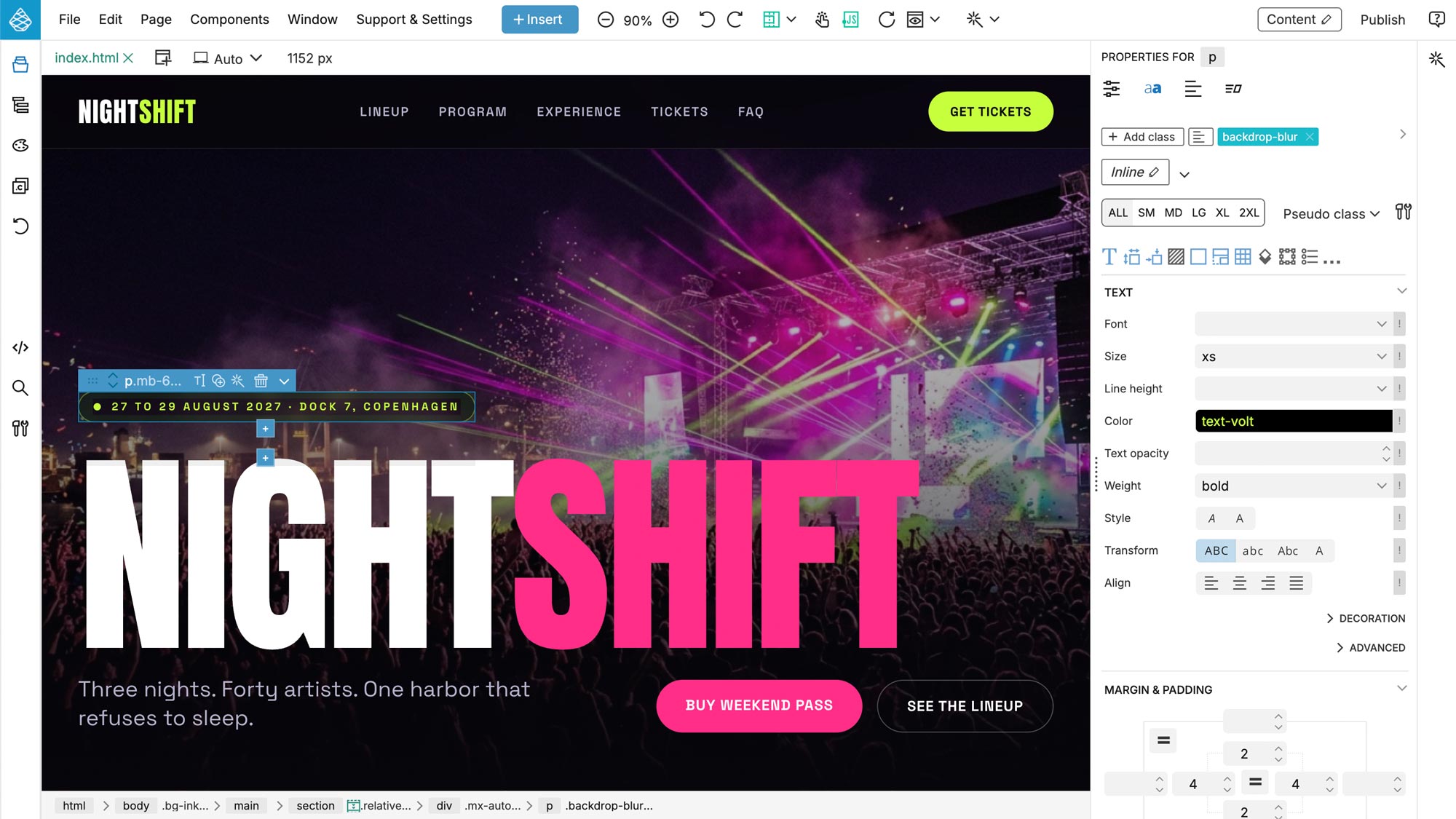
Pinegrow is a desktop app for Mac, Windows, and Linux that lets you build responsive websites visually using HTML, CSS, Tailwind, Bootstrap, and WordPress templates. Unlike Webflow, which hosts your site and restricts code exporting to paid plans, Pinegrow edits your files directly on your local drive. This means you own 100% of your code, can use any hosting provider, and never pay per-site platform fees. Developers wanting a professional visual editor that edits standard web files on their own terms pick Pinegrow; designers looking for a managed cloud workspace and host select Webflow.
Feature comparison matrix
| Feature | Pinegrow | Webflow | Why it matters |
|---|---|---|---|
| Platform type | Desktop application (macOS, Windows, Linux) | Cloud-hosted web browser app | Pinegrow works offline and saves files locally. |
| Code access | Saves standard HTML/CSS files on your disk | Hosted code, export requires paid subscription | Pinegrow has zero code lock-in and exports immediately. |
| Framework support | Tailwind CSS, Bootstrap, native HTML/CSS, WordPress | Proprietary layout engine compiled to CSS | Pinegrow supports Tailwind design visually. |
Why buyers actually switch from Webflow to Pinegrow
Web developers switch to Pinegrow when they want a visual editor that integrates into their local Git, code editors, and custom build pipelines.
1. Local file ownership
Pinegrow is a visual document editor. It works directly with your HTML and CSS files, letting you use Git or compile locally.
2. No monthly hosting overhead
Because your site is exported as standard code, you can host it for free on Netlify, GitHub Pages, or any low-cost hosting.
Deep dive: Tailwind CSS Visual Styling
Pinegrow provides visual controls for Tailwind CSS classes without abstracting them.
Visual class editor
Select elements and toggle Tailwind utility classes visually, watching the layout compile in real time on the canvas.
Who Pinegrow is actually for
1. Frontend developers
Developers who want visual speed but write Tailwind and HTML files locally.
Migration walkthrough: how to switch from Webflow to Pinegrow
Step 1: Open files locally
Create a new project directory on your computer and open it inside Pinegrow.
Objection handling: “Can I host my Pinegrow site anywhere?”
Yes. Pinegrow outputs standard, optimized HTML/CSS code files. You can host them on Vercel, Netlify, Cloudflare Pages, AWS, or any standard web server without constraints.
Pricing breakdown
| Plan | Pinegrow | Webflow |
|---|---|---|
| Free / Trial | Free trial available | Free plan with Webflow subdomain |
| Paid license | One-time purchase or monthly subscription from $12/month | Site plan starts at $14/site/month |
Illustrative pricing — verify current figures before relying on this.
FAQ
- Is Pinegrow a one-time purchase?
- Yes, Pinegrow offers perpetual licenses (one-time purchase) as well as monthly/annual subscriptions.
- Can I edit Tailwind CSS in Pinegrow?
- Yes, Pinegrow has full visual controls for Tailwind CSS classes and automatically compiles them.
- Does Pinegrow run on my desktop?
- Yes, Pinegrow is a desktop app for macOS, Windows, and Linux that runs completely offline.
- How does Pinegrow avoid vendor lock-in?
- It edits standard HTML/CSS files directly on your disk, letting you use Git and host anywhere.
- Can Pinegrow create WordPress themes?
- Yes, Pinegrow can visually convert standard HTML layouts into fully functional PHP WordPress themes.
- Do I pay hosting fees to Pinegrow?
- No. You host your compiled HTML/CSS files on any host (like Netlify or GitHub Pages) for free.
- Can I import Webflow code to Pinegrow?
- Yes, you can open any exported Webflow HTML file in Pinegrow and continue editing visually.
- Does Pinegrow support Bootstrap?
- Yes, Pinegrow has native visual support for Bootstrap 5 and Bootstrap 4.
- Is Pinegrow suitable for non-technical users?
- Pinegrow exposes the actual HTML/CSS box model, making it best suited for developers or designers who understand code.
- Does Pinegrow support CSS Grid?
- Yes, it includes a visual CSS Grid editor to build responsive layouts easily.
Community Discussions & Reviews
Real feedback from verified buyers, founders, and engineering teams using these products.